
Lab 8: Turn with a Gyro, Drive with Encoders#
Why it matters#
In Lab 7, the timed square never closed. Every "90° turn" was really just "spin for half a second," and the robot had no idea how far it had actually turned.
A gyro fixes that. It measures how far the robot has rotated, so instead of "spin for 0.5 seconds" you can say "spin until you've turned 90°." In this lab you'll add the team's NavX2 to the West Coast Drive, read the robot's heading, and use it to make turns that land where you meant.
Then you'll fix the other half of the square. The sides were timed too. The WCD has an encoder on each gearbox, so you'll measure how far each side has rolled, in meters, and drive exact distances. By the end, the square is driven entirely by sensors: encoders for the straight sides and the gyro for the turns.
Before you start: finish Lab 7 and keep its repeatability table. You'll add to the same WestCoastDrive project. Lesson 8 covers gyros. Lesson 4.3 covers the NavX2's hardware and mounting.
Read this#
Walkthrough#
What a gyro measures#
The NavX2 measures rotation around three axes. For driving, the one that matters is yaw: how far the robot has turned left or right, seen from above. That's the robot's heading.
| Robot turns | Heading (WPILib convention) |
|---|---|
| Left (counterclockwise from above) | Goes up |
| Right (clockwise from above) | Goes down |
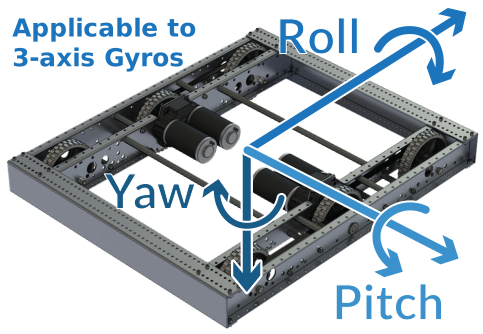
Yaw is the robot turning left or right. That's the heading. From the WPILib docs, Gyroscopes - Hardware (CC BY 4.0).
The heading keeps counting past 360°. Spin left twice and it reads about 720°.
Two sign conventions
The NavX's own getAngle() and getYaw() count clockwise as positive. WPILib counts counterclockwise as positive. To avoid mixing them up, this lab only uses getRotation2d(), which already follows WPILib's convention.
The hardware#
The NavX2 plugs into the roboRIO's MXP port (the wide connector in the middle). It talks to the roboRIO over SPI through that port.
If your NavX is connected differently
Over USB, use NavXComType.kUSB1 instead of kMXP_SPI in Step 3. Everything else stays the same.
Each side's gearbox also has a REV Through Bore Encoder on its output shaft, the shaft that drives the wheels. Because the encoder turns at the same speed as the wheels, one encoder rotation is one wheel rotation. Both encoders are wired to the roboRIO's DIO ports, two ports each, the same way as the elevator's encoder in Lab 10 and the test bed wheel in Lab 6.
| Encoder | DIO ports |
|---|---|
| Left gearbox | 2 and 3 |
| Right gearbox | 4 and 5 |
Check your robot's wiring and use your real port numbers in Step 8.
Step 1: Calibration#
When the robot powers on, the NavX spends a few seconds calibrating: measuring itself while sitting perfectly still. If the robot moves during that time, the heading will drift for the rest of the session.
Keep it still at power-on
Turn on the robot and don't touch it for about 10 seconds. You'll add a dashboard light in Step 4 that shows when calibration is done.
Step 2: Install the NavX library#
The NavX library comes from Studica, the company that makes it.
- Open WPILib → Vendor Dependencies in the VS Code sidebar.
- Find Studica (the NavX library) and click Install.
- If it isn't in the list, use Ctrl+Shift+P → WPILib: Manage Vendor Libraries → Install new library (online) and paste the vendordep URL from Studica's NavX documentation.
- Check that a Studica
.jsonfile appears invendordeps/.
Step 3: Add the gyro to the drive subsystem#
Open DriveSubsystem.java. Add the imports:
import com.studica.frc.AHRS;
import com.studica.frc.AHRS.NavXComType;
Add the gyro as a field:
  // NavX2 on the roboRIO's MXP port, talking over SPI
  private final AHRS m_gyro = new AHRS(NavXComType.kMXP_SPI);
| Part | What it means |
|---|---|
AHRS |
Studica's class for the NavX. AHRS stands for "attitude and heading reference system": a sensor that knows which way it's pointing. |
NavXComType.kMXP_SPI |
How the NavX talks to the roboRIO: plugged into the MXP port, using the fast SPI connection |
Add methods to read and reset the heading:
  /** Robot heading in degrees. Turning left (counterclockwise) makes it go up. */
  public double getHeadingDegrees() {
    return m_gyro.getRotation2d().getDegrees();
  }

  /** Makes the current direction the new 0°. Works while disabled. */
  public Command zeroHeadingCommand() {
    return runOnce(m_gyro::reset).ignoringDisable(true).withName("Zero Heading");
  }
| Code | What it does |
|---|---|
m_gyro.getRotation2d() |
The robot's heading as a WPILib Rotation2d, where left (counterclockwise) is positive, the WPILib standard |
.getDegrees() |
Turns that into a plain number of degrees |
runOnce(m_gyro::reset) |
Makes "the way the robot is pointing right now" the new 0° |
.ignoringDisable(true) |
Lets you zero it while the robot is disabled, before a match |
Step 4: Show it on the dashboard#
Add to the drive subsystem's periodic(). These go in Telemetry → Drive, in a Gyro folder:
    m_telemetry.log("Gyro/Heading (deg)", getHeadingDegrees());
    m_telemetry.log("Gyro/Connected", m_gyro.isConnected());
    m_telemetry.log("Gyro/Calibrating", m_gyro.isCalibrating());
And bind a button to zero the heading, in configureBindings():
m_controller.back().onTrue(m_driveSubsystem.zeroHeadingCommand());
Step 5: Check the gyro by hand#
Deploy. Leave the robot disabled. Wait until Calibrating shows false and Connected shows true.
- Press Back to zero the heading. It reads about 0.
- Push the robot by hand so it turns left about a quarter turn. The heading should read about +90.
- Turn it back. The heading returns to about 0.
- Turn it right a quarter turn. About −90.
- Leave it completely still for a minute and watch the heading. Does it change at all? That slow creep is drift, and every gyro has a little.
If Connected is false, check the NavX is fully seated on the MXP port and that the library is installed.
Step 6: Turn by the gyro (bang-bang)#
Now replace "spin for 0.5 seconds" with "spin until the heading changes by 90°." Add to DriveSubsystem:
  private double m_turnTarget = 0.0;

  /**
   * Spins in place until the heading has changed by the given degrees.
   * Positive = turn left, negative = turn right.
   */
  public Command turnDegreesCommand(double degrees, double speed) {
    double direction = Math.signum(degrees);   // +1 for left, -1 for right
    return runOnce(() -> m_turnTarget = getHeadingDegrees() + degrees)
        .andThen(run(() -> m_drive.tankDrive(-direction * speed, direction * speed, false)))
        .until(() -> direction > 0
            ? getHeadingDegrees() >= m_turnTarget     // turning left: wait until we pass the target
            : getHeadingDegrees() <= m_turnTarget)    // turning right: wait until we pass it going down
        .withTimeout(3.0)                             // safety: give up if the gyro never gets there
        .finallyDo(() -> m_drive.stopMotor())
        .withName("Turn " + degrees + " deg");
  }
Reading it:
| Piece | What it does |
|---|---|
private double m_turnTarget |
A field, so periodic() can show the target on the dashboard while the turn runs |
double direction = Math.signum(degrees); |
Math.signum gives +1 for a positive number and -1 for a negative one. Positive degrees means turn left, so direction is +1 for left and -1 for right. |
runOnce(() -> m_turnTarget = getHeadingDegrees() + degrees) |
Remembers where to stop: 90° from wherever the robot is now |
tankDrive(-direction * speed, direction * speed, false) |
Spins in place. For a left turn, left side back and right side forward. |
.until(...) |
Stops the moment the heading reaches the target |
direction > 0 ? A : B |
A ternary: "if turning left, use check A; otherwise use check B." Turning left, the heading goes up to the target (>=); turning right, it goes down (<=). |
.withTimeout(3.0) |
If the gyro is unplugged, the heading never changes. This stops the robot anyway. |
Add the debug values to periodic() so you can watch it:
    m_telemetry.log("Gyro/Turn Target (deg)", m_turnTarget);
    m_telemetry.log("Gyro/Turn Error (deg)", m_turnTarget - getHeadingDegrees());
Bind it to test, in configureBindings():
    m_controller.x().onTrue(m_driveSubsystem.turnDegreesCommand(90, 0.4));    // turn left 90°
    m_controller.b().onTrue(m_driveSubsystem.turnDegreesCommand(-90, 0.4));   // turn right 90°
On the floor, in open space: press X, let the robot turn, and read Heading after it stops. Try speeds of 0.3, 0.5, and 0.7.
| Speed | Target | Where it stopped | Overshoot |
|---|---|---|---|
| 0.3 | 90 | ||
| 0.5 | 90 | ||
| 0.7 | 90 |
What you'll see: It always turns at least 90°, so it's far better than timing. But it overshoots, more at higher speeds. When the gyro says "90!", the robot is still spinning and takes time to stop. It's the same bang-bang overshoot you saw on the wheel in Lab 6.
Step 7: Slow down near the end#
One simple fix: turn fast for most of the way, then slow for the last part. This command picks its speed every loop from how far it still has to turn:
  /** Fast until 20 degrees from the target, then slow. */
  public Command twoSpeedTurnCommand(double degrees) {
    double direction = Math.signum(degrees);
    return runOnce(() -> m_turnTarget = getHeadingDegrees() + degrees)
        .andThen(run(() -> {
            double remaining = Math.abs(m_turnTarget - getHeadingDegrees());
            double speed = (remaining > 20.0) ? 0.6 : 0.25;   // fast far away, slow up close
            m_drive.tankDrive(-direction * speed, direction * speed, false);
        }))
        .until(() -> direction > 0
            ? getHeadingDegrees() >= m_turnTarget
            : getHeadingDegrees() <= m_turnTarget)
        .withTimeout(3.0)
        .finallyDo(() -> m_drive.stopMotor())
        .withName("Two-Speed Turn " + degrees);
  }
The target is set once, at the start, so the whole turn aims at the same spot. Only the speed changes along the way.
The new part is inside run(...), which now has curly braces { } because it does several things every loop:
| Line | What it does |
|---|---|
double remaining = Math.abs(m_turnTarget - getHeadingDegrees()); |
How many degrees are left. Math.abs drops the minus sign, so it works for left and right turns. |
double speed = (remaining > 20.0) ? 0.6 : 0.25; |
Another ternary: more than 20° to go, use 0.6; otherwise 0.25 |
m_drive.tankDrive(-direction * speed, direction * speed, false); |
Spin at that speed, in the right direction |
Bind it to Y:
m_controller.y().onTrue(m_driveSubsystem.twoSpeedTurnCommand(90));
Compare its overshoot with the one-speed turn from Step 6.
Think about it
Two speeds work better than one. What about ten speeds, each a bit slower as the robot gets closer? Or a speed that shrinks smoothly with the distance left to turn? That idea has a name: it's the P in PID, and it's coming in Lab 9.
Step 8: Add the drive encoders#
First, wire them. Each Through Bore Encoder's cable ends in four 3-pin plugs. Only the blue and yellow plugs go to the roboRIO:
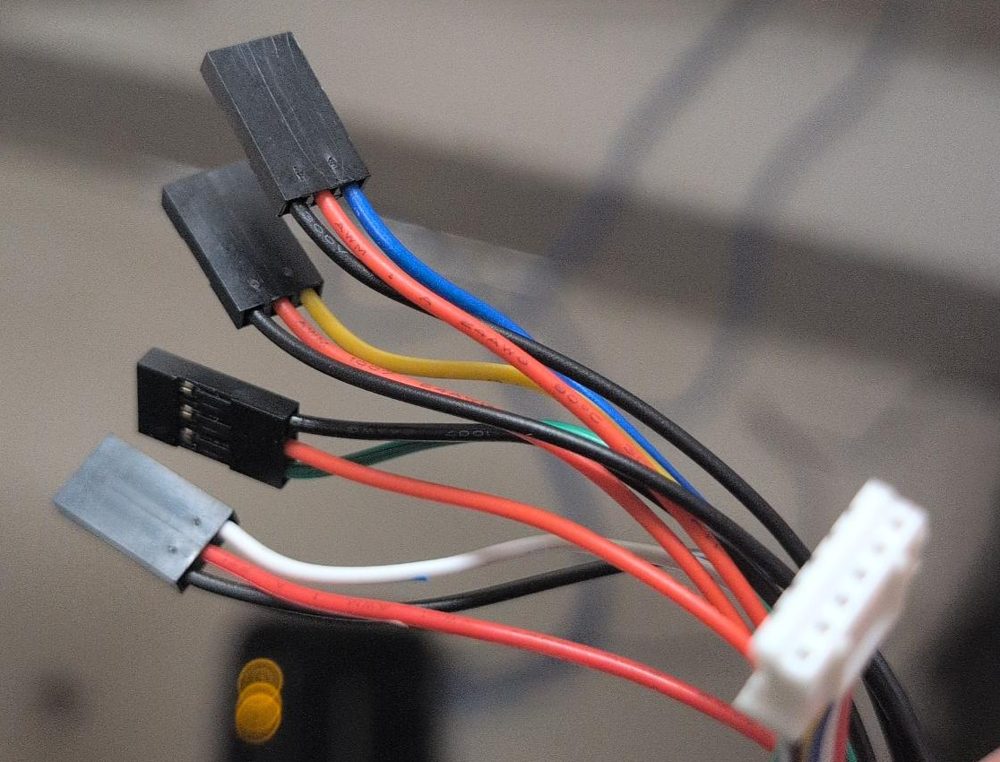
The encoder end of the cable is the white JST plug (right). The four 3-pin Dupont plugs go to the roboRIO. Each has a red wire (5 V), a black wire (ground), and one colored signal wire.
Left gearbox encoder:
| Plug (signal wire color) | Signal | Goes to |
|---|---|---|
| Blue | Channel A | DIO 2 |
| Yellow | Channel B | DIO 3 |
| Green | Index (once per turn) | Not used. Leave it unplugged and tape it out of the way. |
| White | Absolute position | Not used in these labs. Leave it unplugged and tape it out of the way. |
Right gearbox encoder:
| Plug (signal wire color) | Signal | Goes to |
|---|---|---|
| Blue | Channel A | DIO 4 |
| Yellow | Channel B | DIO 5 |
| Green | Index (once per turn) | Not used. Leave it unplugged and tape it out of the way. |
| White | Absolute position | Not used in these labs. Leave it unplugged and tape it out of the way. |
Which way around? Each roboRIO DIO port is three pins in a row, and the roboRIO has a label printed next to each row of pins: the ground symbol (⏚), V (5 V), and S (signal). Turn each plug so the black wire is on ground (⏚), the red wire is on V, and the blue or yellow wire is on S. Every plug on this cable has its own red and black, so each one powers itself; that's normal. Follow each cable back to its gearbox as you plug it in, so the left encoder doesn't end up on the right side's ports. (Lesson 4.3 has more.)
Then add the code. Add these to kDriveConstants in Constants.java, and add import edu.wpi.first.math.util.Units; at the top of the file:
    // Lab 8: Through Bore Encoders on each gearbox output shaft, wired to the roboRIO
    public static final int LeftEncoderChannelA = 2;
    public static final int LeftEncoderChannelB = 3;
    public static final int RightEncoderChannelA = 4;
    public static final int RightEncoderChannelB = 5;
    public static final boolean LeftEncoderInverted = false;
    public static final boolean RightEncoderInverted = true;   // the right side faces the other way
    public static final int EncoderCyclesPerRev = 2048;        // Through Bore: 2048 cycles per turn

    public static final double WheelDiameterMeters = Units.inchesToMeters(6.0);
    public static final double MetersPerRotation = Math.PI * WheelDiameterMeters;   // about 0.479 m
    public static final double TrackWidthMeters = 0.6;   // measure yours: left wheels' center to right wheels' center
| Constant | What it's for |
|---|---|
...ChannelA, ...ChannelB |
The two DIO ports each encoder is wired to |
RightEncoderInverted = true |
The right gearbox faces the other way, so its encoder counts backward when the robot drives forward. This flips it, the same idea as inverting the right motor in Lab 2. |
WheelDiameterMeters |
6-inch wheels. Units.inchesToMeters does the conversion (6 in = 0.1524 m). |
MetersPerRotation |
How far the robot rolls when a wheel turns once: the wheel's circumference, π × diameter |
TrackWidthMeters |
The distance between the left and right wheels. You'll use it in Step 11. Measure it with a tape measure. |
Now open DriveSubsystem.java. Add the imports:
import edu.wpi.first.wpilibj.CounterBase.EncodingType;
import edu.wpi.first.wpilibj.Encoder;
Add the encoders as fields, below the gyro:
  // Through Bore Encoders on each side's gearbox output shaft (Lab 8)
  private final Encoder m_leftEncoder = new Encoder(
      kDriveConstants.LeftEncoderChannelA,
      kDriveConstants.LeftEncoderChannelB,
      kDriveConstants.LeftEncoderInverted,
      EncodingType.k4X);
  private final Encoder m_rightEncoder = new Encoder(
      kDriveConstants.RightEncoderChannelA,
      kDriveConstants.RightEncoderChannelB,
      kDriveConstants.RightEncoderInverted,
      EncodingType.k4X);
At the end of the constructor, tell them how far one pulse is:
    // After this, getDistance() is in meters the wheels have rolled
    double metersPerPulse = kDriveConstants.MetersPerRotation / kDriveConstants.EncoderCyclesPerRev;
    m_leftEncoder.setDistancePerPulse(metersPerPulse);
    m_rightEncoder.setDistancePerPulse(metersPerPulse);
One wheel turn is 2048 pulses and 0.479 m, so each pulse is 0.479 ÷ 2048 meters. After this, getDistance() answers in meters, not counts. (It's 2048, not 8192, for the same reason as Lab 6: WPILib already handles the 4X counting.)
Add methods to read them:
  /** How far the left wheels have rolled, in meters, since the last reset. */
  public double getLeftMeters() {
    return m_leftEncoder.getDistance();
  }

  /** How far the right wheels have rolled, in meters, since the last reset. */
  public double getRightMeters() {
    return m_rightEncoder.getDistance();
  }

  /** How far the robot has driven: the average of the two sides. */
  public double getAverageMeters() {
    return (getLeftMeters() + getRightMeters()) / 2.0;
  }

  /** Sets both encoders back to 0. Works while disabled. */
  public Command resetEncodersCommand() {
    return runOnce(() -> {
      m_leftEncoder.reset();
      m_rightEncoder.reset();
    }).ignoringDisable(true).withName("Reset Encoders");
  }
| Method | What it answers |
|---|---|
getLeftMeters(), getRightMeters() |
How far each side has rolled. Forward is positive. |
getAverageMeters() |
How far the robot as a whole has gone. Driving straight, both sides match. Spinning in place, they cancel out to about 0. |
resetEncodersCommand() |
Makes "here" the new 0 m, like zeroing the gyro |
Put them on the dashboard, in periodic():
    m_telemetry.log("Encoders/Left (m)", getLeftMeters());
    m_telemetry.log("Encoders/Right (m)", getRightMeters());
    m_telemetry.log("Encoders/Average (m)", getAverageMeters());
And bind Start to reset them, in configureBindings():
m_controller.start().onTrue(m_driveSubsystem.resetEncodersCommand());
Step 9: Check the encoders#
Deploy. Leave the robot disabled, and open Telemetry → Drive → Encoders in Elastic.
- Press Start to reset. Both read 0.
- Push the robot forward by hand. Both Left and Right must go up. If one goes down, flip that side's
...EncoderInvertedinConstants. - Put a tape mark on the floor, push the robot forward exactly 1 meter, and read Average. It should be close to 1.00.
| What you see | Likely cause |
|---|---|
| Average reads about 4.0 after 1 m | EncoderCyclesPerRev is 8192 instead of 2048 |
| Average reads about 0.25 after 1 m | The wrong number somewhere in metersPerPulse, or one encoder isn't counting (so the average is half). Check both sides separately. |
| One side always reads 0 | That encoder's DIO ports are wrong, or a wire is loose |
A little off is normal
Wheels squish a bit under the robot's weight, and tread wears down, so a "6-inch" wheel rolls a little less than 0.479 m. If you're off by a steady few percent, adjust WheelDiameterMeters until 1 m reads 1.00.
Step 10: Drive a distance#
Add a command to DriveSubsystem that drives until the encoders say it's gone far enough. It's built just like the gyro turn:
  private double m_distanceTarget = 0.0;   // where the current drive is trying to stop

  /**
   * Drives straight until the robot has gone the given distance, in meters.
   * Positive = forward, negative = backward.
   */
  public Command driveDistanceCommand(double meters, double speed) {
    double direction = Math.signum(meters);   // +1 forward, -1 backward
    return runOnce(() -> m_distanceTarget = getAverageMeters() + meters)
        .andThen(run(() -> m_drive.tankDrive(direction * speed, direction * speed, false)))
        .until(() -> direction > 0
            ? getAverageMeters() >= m_distanceTarget     // forward: wait until we pass it
            : getAverageMeters() <= m_distanceTarget)    // backward: wait until we pass it going down
        .withTimeout(5.0)                                // safety: give up if the encoders never get there
        .finallyDo(() -> m_drive.stopMotor())
        .withName("Drive " + meters + " m");
  }
| Piece | What it does |
|---|---|
m_distanceTarget = getAverageMeters() + meters |
Remembers where to stop: 1 m from wherever the robot is now, so you don't have to reset first |
tankDrive(direction * speed, direction * speed, false) |
Both sides the same speed: straight forward (or straight back) |
.until(...) |
Stops the moment the average distance passes the target |
.withTimeout(5.0) |
If an encoder is unplugged, the distance never changes. This stops the robot anyway. |
Add the target to periodic() so you can watch it:
m_telemetry.log("Encoders/Distance Target (m)", m_distanceTarget);
Bind it to A, in configureBindings():
m_controller.a().onTrue(m_driveSubsystem.driveDistanceCommand(1.0, 0.4)); // drive 1 meter
On the floor, with a tape mark at the robot's front edge: press A and measure where it stops. Try speeds of 0.3, 0.5, and 0.7.
What you'll see: It goes at least 1 m every time, with a little overshoot that grows with speed. It's the same bang-bang overshoot as the gyro turns and the Lab 6 wheel. Unlike the timed drive in Lab 7, though, a tired battery doesn't make it come up short: it just takes longer to get there.
Step 11: Why turns use the gyro, not the encoders#
If the left side rolls backward and the right side rolls forward by the same amount, the robot spins. So you could estimate the heading from the encoders alone:
  /** Heading estimated from the encoders alone, in degrees. Watch how wrong it gets. */
  public double getEncoderHeadingDegrees() {
    return Math.toDegrees((getRightMeters() - getLeftMeters()) / kDriveConstants.TrackWidthMeters);
  }
| Part | What it means |
|---|---|
getRightMeters() - getLeftMeters() |
How much farther the right side has rolled than the left |
/ TrackWidthMeters |
Divided by the distance between the wheels, that's the angle turned, in radians |
Math.toDegrees(...) |
Radians to degrees |
Add it to periodic():
m_telemetry.log("Encoders/Heading Estimate (deg)", getEncoderHeadingDegrees());
Try it: zero the gyro (Back), reset the encoders (Start), and press X to turn 90° by the gyro. Compare Gyro → Heading with Encoders → Heading Estimate.
What you'll see: The encoder estimate says the robot turned much more than 90°, sometimes 120° or more. A skid steer skids: to turn, its wheels slide sideways across the floor, so they roll farther than the robot actually turns. The encoders count every bit of that rolling. The gyro measures the robot's real rotation, so it's the sensor to trust for turns. Encoders are great for straight driving, where the wheels don't slide.
Step 12: A square that closes#
Go back to RobotContainer's squareSide() from Lab 7. Swap the timed forward drive for an encoder drive, and the timed spin for a gyro turn:
  private Command squareSide() {
    return Commands.sequence(
        m_driveSubsystem.driveDistanceCommand(1.0, 0.4),          // forward 1 m by the encoders
        m_driveSubsystem.driveForSecondsCommand(0.0, 0.0, 0.3),   // pause
        m_driveSubsystem.twoSpeedTurnCommand(90),                 // turn left by the gyro
        m_driveSubsystem.driveForSecondsCommand(0.0, 0.0, 0.3));  // pause
  }
Import Commands if needed. Run Square five times and fill in the same table as Lab 7. Compare the two tables: the timed square from Lab 7, and this one, driven entirely by sensors.
Step 13: Commit#
git add .
git commit -m "Lab 8: NavX gyro turns and encoder distances"
When it doesn't work#
| Problem | Likely cause |
|---|---|
Build error: cannot find symbol AHRS |
The Studica library isn't installed (Step 2) |
| Connected is false | NavX not fully seated on the MXP port, or the wrong NavXComType |
| Heading slowly creeps while sitting still | Normal drift, but a lot of it means the robot moved during calibration. Restart the robot and keep it still. |
| Heading goes down when turning left | You used getAngle() or getYaw() instead of getRotation2d() |
| Robot spins forever, then stops after 3 seconds | It turned the opposite way from the target: check the signs in tankDrive for the turn |
| One encoder counts down when pushing forward | Flip that side's ...EncoderInverted in Constants |
| Drive distance never stops (until the 5 second timeout) | An encoder isn't counting, or it counts backward, so the average never reaches the target |
| Distances are about 4 times too big | EncoderCyclesPerRev is 8192; it should be 2048 |
Finished code
Stuck, or missed a lab? lab08-navx-gyro on GitHub is the complete project as it looks at the end of this lab. It's a full WPILib 2026 project you can open in VS Code, build, and deploy. Try to finish the lab yourself first.
Try it#
- Check the heading by hand: +90 left, −90 right
- Measure drift: how much does the heading change in one minute sitting still?
- Fill in the speed vs. overshoot table for one-speed turns
- Compare one-speed and two-speed turns
- Check both encoders by hand: both count up going forward, and 1 m reads about 1.00
- Drive 1 m at three speeds and measure the overshoot
- Compare the gyro heading and the encoder heading estimate after a 90° turn. How far off is the estimate?
- Run the sensor square and compare with your Lab 7 table
- Challenge: make
driveDistanceCommandslow down for the last 0.2 m, like the two-speed turn - Turn 360° and see if the robot ends facing the same way
- Challenge: write
turnToHeadingCommand(double heading)that turns to an absolute heading (like "face 0°") instead of "turn by" an amount
Check yourself#
Why is the right encoder inverted?
The right gearbox faces the opposite way, so its shaft spins the opposite direction when the robot drives forward. Inverting it makes forward count up on both sides.
With 6-inch wheels, how far does the robot roll when a wheel turns once?
π × 6 in ≈ 18.85 in ≈ 0.479 m
Why use the average of both encoders for driving distance?
Driving straight, both sides roll the same distance. If the robot drifts a little to one side, the average is still about the distance its center traveled.
Why does the encoder heading estimate say the robot turned more than it really did?
A skid steer's wheels slide sideways when it turns, so they roll farther than the robot rotates. The encoders count all of that rolling. The gyro measures the real rotation.
What does a gyro measure?
How much the robot has rotated. Yaw, the rotation seen from above, is the robot's heading.
Why must the robot stay still when it powers on?
The NavX calibrates during the first few seconds. If the robot moves, the calibration is off and the heading drifts all session.
Why use getRotation2d() instead of getAngle()?
getRotation2d() counts counterclockwise as positive, matching WPILib. The NavX's own getAngle() counts clockwise as positive, which flips every sign.
Why does turnDegreesCommand store a target instead of just using 90?
The robot might not be at 0° when the turn starts. Storing "current heading + 90" makes it turn 90° from wherever it is.
Why does the gyro turn still overshoot?
It's bang-bang: full speed until the heading reaches the target, then stop. The robot is still spinning at that moment and takes time to stop.
Why does the two-speed turn overshoot less?
It's going slower when it reaches the target, so it carries less momentum and stops sooner.