
Lab 6: Count Turns with an Encoder#
Why it matters#
The limit switch told you whether something happened. The knob told you where a dial was. An encoder tells you how far a shaft has turned, and how fast it's turning, which is what you need to move a mechanism a precise amount.
In this lab you'll read the encoder on the test bed's 775pro wheel, turn its raw counts into wheel rotations, and then try to make the wheel turn exactly 10 times two different ways. Neither way will be perfect. Seeing exactly how they miss is what makes PID make sense in Lab 9.
Before you start: finish Lab 5. You'll add to the same TestBed project. Lesson 8 explains encoders and units. Lessons 4.1 (the 775pro) and 4.3 (the Through Bore Encoder) cover this lab's hardware.
Read this#
Walkthrough#
The hardware#
| Part | Connected to | In code |
|---|---|---|
| 775pro motor driving the wheel through a gearbox | SPARK MAX, brushed mode, on CAN | REVLib SparkMax |
| Quadrature encoder on the wheel's shaft | roboRIO DIO ports (channel A and B) | WPILib Encoder |
| A second Xbox controller | Driver Station, slot 1 | CommandXboxController(1) |
Wiring the encoder#
The REV Through Bore Encoder's cable ends in four 3-pin plugs. Only two go to the roboRIO:
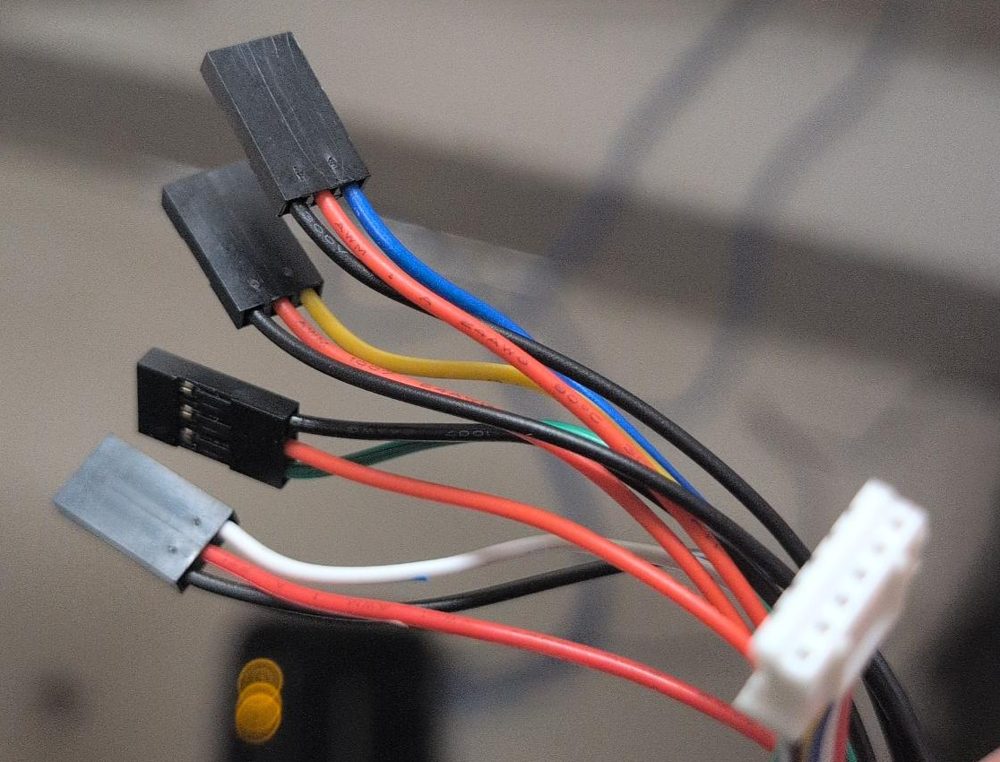
The encoder end of the cable is the white JST plug (right). The four 3-pin Dupont plugs go to the roboRIO. Each has a red wire (5 V), a black wire (ground), and one colored signal wire.
| Plug (signal wire color) | Signal | Goes to |
|---|---|---|
| Blue | Channel A | DIO 0 |
| Yellow | Channel B | DIO 1 |
| Green | Index (once per turn) | Not used. Leave it unplugged and tape it out of the way. |
| White | Absolute position | Not used in these labs. Leave it unplugged and tape it out of the way. |
Which way around? Each roboRIO DIO port is three pins in a row, and the roboRIO has a label printed next to each row of pins: the ground symbol (⏚), V (5 V), and S (signal). Turn each plug so the black wire is on ground (⏚), the red wire is on V, and the blue or yellow wire is on S. Every plug on this cable has its own red and black, so each one powers itself; that's normal. (Lesson 4.3 has more.)
We count turns of the wheel, not the motor. A 775pro spins about 18,700 RPM with no load, so 10 turns of the motor shaft would be over in a blink. The gearbox slows it down enough to watch.
Why a second controller?
Your first controller already has buttons for the brushless motor from Labs 1 to 5. Giving the wheel its own controller keeps every binding working. Real robots do the same thing: a driver controller and an operator controller. No second controller? Comment out the Lab 3 bindings while you do this lab.
Safety
Keep fingers, hair, and loose sleeves away from the wheel. The 775pro has a lot of power and burns out if it stalls, so never hold the wheel still while the motor is pushing. Have one person ready to disable at all times.
How a quadrature encoder counts#
A quadrature encoder sends two square-wave signals, A and B, a quarter-cycle apart. Each full cycle means the shaft turned a tiny bit. Which signal changes first tells the roboRIO the direction.
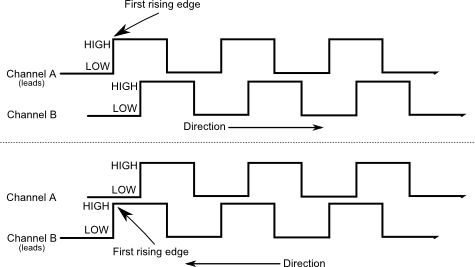
Which channel rises first tells the roboRIO the direction. From the WPILib docs, Encoders - Software (CC BY 4.0).
The roboRIO counts every rising and falling edge on both channels: that's 4 counts per cycle ("4x decoding"). A REV Through Bore Encoder makes 2048 cycles per revolution, which is 8192 counts.
| Term | Through Bore Encoder |
|---|---|
| Cycles per revolution (WPILib calls these "pulses") | 2048 |
| Counts per revolution (4x decoding) | 8192 |
The roboRIO's FPGA chip counts in hardware, so it never misses a count, even though your code only runs every 20 ms.
Step 1: Check the SPARK MAX#
Open the REV Hardware Client and write down the CAN ID of the 775pro's SPARK MAX. It's a brushed motor, so this SPARK MAX must be in brushed mode, unlike the NEO's.
Step 2: Constants#
Add this class inside Constants in Constants.java. Fill in your real CAN ID and DIO ports.
public static class kWheelConstants {
    public static final int MotorCanId = 9;
    public static final boolean MotorInverted = false;

    public static final int EncoderChannelA = 0;
    public static final int EncoderChannelB = 1;
    public static final boolean EncoderInverted = false;
    // WPILib counts in quadrature CYCLES. Through Bore Encoder = 2048 (not 8192).
    public static final int EncoderCyclesPerRev = 2048;

    public static final int CurrentLimitAmps = 30;   // protects the 775pro
    public static final double MaxVolts = 6.0;       // keeps PID tests gentle in Lab 9
}
Step 3: The subsystem#
Create subsystems/WheelSubsystem.java. This part sets up the motor and encoder, converts to wheel rotations, and publishes telemetry. No movement commands yet.
package frc.robot.subsystems;

import com.revrobotics.PersistMode;
import com.revrobotics.ResetMode;
import com.revrobotics.spark.SparkLowLevel.MotorType;
import com.revrobotics.spark.SparkMax;
import com.revrobotics.spark.config.SparkBaseConfig.IdleMode;
import com.revrobotics.spark.config.SparkMaxConfig;

import edu.wpi.first.wpilibj.CounterBase.EncodingType;
import edu.wpi.first.wpilibj.Encoder;
import edu.wpi.first.wpilibj2.command.Command;
import edu.wpi.first.wpilibj2.command.SubsystemBase;
import frc.robot.Constants.kWheelConstants;
import frc.robot.telemetry.Telemetry;
import frc.robot.telemetry.TelemetryTable;

public class WheelSubsystem extends SubsystemBase {
    private final SparkMax m_motor =
        new SparkMax(kWheelConstants.MotorCanId, MotorType.kBrushed);

    private final Encoder m_encoder = new Encoder(
        kWheelConstants.EncoderChannelA,
        kWheelConstants.EncoderChannelB,
        kWheelConstants.EncoderInverted,
        EncodingType.k4X);

    private double m_target = 0.0;     // where the current attempt is trying to stop
    private double m_lastVolts = 0.0;  // for the dashboard

    private final TelemetryTable m_telemetry = Telemetry.getTable("Wheel");

    public WheelSubsystem() {
        SparkMaxConfig config = new SparkMaxConfig();
        config.smartCurrentLimit(kWheelConstants.CurrentLimitAmps);
        config.idleMode(IdleMode.kBrake);
        config.inverted(kWheelConstants.MotorInverted);
        m_motor.configure(config, ResetMode.kResetSafeParameters, PersistMode.kPersistParameters);

        // One "pulse" = one quadrature cycle. After this, getDistance() is in wheel rotations.
        m_encoder.setDistancePerPulse(1.0 / kWheelConstants.EncoderCyclesPerRev);
    }

    public double getRotations() { return m_encoder.getDistance(); }
    public double getRps()       { return m_encoder.getRate(); }

    private void setVolts(double volts) {
        m_lastVolts = volts;
        m_motor.setVoltage(volts);
    }

    private void stop() {
        m_lastVolts = 0.0;
        m_motor.stopMotor();
    }

    /** Every attempt turns a number of rotations FROM WHEREVER THE WHEEL IS NOW. */
    private void setTargetFromHere(double rotations) {
        m_target = getRotations() + rotations;
    }

    public Command zero() {
        return runOnce(m_encoder::reset).ignoringDisable(true).withName("Zero");
    }

    public Command idle() {
        return run(this::stop).withName("Idle");
    }

    @Override
    public void periodic() {
        m_telemetry.log("Position (rot)", getRotations());
        m_telemetry.log("Target (rot)", m_target);
        m_telemetry.log("Error (rot)", m_target - getRotations());
        m_telemetry.log("Velocity (rot per s)", getRps());
        m_telemetry.log("Output (V)", m_lastVolts);
        m_telemetry.log("Current (A)", m_motor.getOutputCurrent());
    }
}
The wheel subsystem, piece by piece#
1. The motor: a brushed 775pro#
private final SparkMax m_motor =
    new SparkMax(kWheelConstants.MotorCanId, MotorType.kBrushed);
The same kind of field as Lab 1, but this SPARK MAX drives a 775pro, which is brushed, on CAN ID 9.
2. The encoder#
private final Encoder m_encoder = new Encoder(
    kWheelConstants.EncoderChannelA,
    kWheelConstants.EncoderChannelB,
    kWheelConstants.EncoderInverted,
    EncodingType.k4X);
| Argument | What it means |
|---|---|
EncoderChannelA, EncoderChannelB |
The two DIO ports the encoder's A and B wires are plugged into (0 and 1) |
EncoderInverted |
true flips the direction, so "forward" counts up. You'll check this in Step 5. |
EncodingType.k4X |
Count every edge of both signals: 4 counts per cycle, the most precise setting |
Encoder is a WPILib class: the encoder is wired to the roboRIO, not to the SPARK MAX.
3. Remembering the target and the output#
private double m_target = 0.0;     // where the current attempt is trying to stop
private double m_lastVolts = 0.0;  // for the dashboard

private final TelemetryTable m_telemetry = Telemetry.getTable("Wheel");
These aren't final, because they change while the robot runs. m_target is where the current move is trying to stop. m_lastVolts remembers the last voltage sent, so the dashboard can show it.
4. The constructor#
SparkMaxConfig config = new SparkMaxConfig();
config.smartCurrentLimit(kWheelConstants.CurrentLimitAmps);
config.idleMode(IdleMode.kBrake);
config.inverted(kWheelConstants.MotorInverted);
m_motor.configure(config, ResetMode.kResetSafeParameters, PersistMode.kPersistParameters);

m_encoder.setDistancePerPulse(1.0 / kWheelConstants.EncoderCyclesPerRev);
The first five lines set up the motor like Lab 1, with a 30 A limit (a 775pro overheats quickly) and a setting to flip the motor's direction if needed.
The last line is the important one. setDistancePerPulse tells the encoder how far one "pulse" (one full cycle) moves. One wheel rotation is 2048 cycles, so one cycle is 1.0 / 2048 of a rotation. After this line, getDistance() answers in wheel rotations instead of raw counts. (The 4X counting is handled for you; that's why it's 2048, not 8192.)
5. Small methods with clear names#
public double getRotations() { return m_encoder.getDistance(); }
public double getRps()       { return m_encoder.getRate(); }
| Method | Answers |
|---|---|
getRotations() |
How many rotations the wheel has turned since the encoder was zeroed |
getRps() |
How fast it's turning right now, in rotations per second. getRate() uses the same distance-per-pulse setting. |
These are written on one line each because they're so short. Giving them names means the rest of the code reads like English: getRotations() >= m_target.
6. Setting the motor, and stopping it#
private void setVolts(double volts) {
    m_lastVolts = volts;
    m_motor.setVoltage(volts);
}

private void stop() {
    m_lastVolts = 0.0;
    m_motor.stopMotor();
}
setVoltage asks for a number of volts (up to about 12), instead of a fraction like set(0.5). 4 V is 4 V whether the battery is full or tired, so tests are more repeatable. Both methods also update m_lastVolts, so the dashboard always shows what the motor was told. They're private: only this subsystem's commands can move the motor.
7. Picking a target from where the wheel is now#
private void setTargetFromHere(double rotations) {
    m_target = getRotations() + rotations;
}
"Turn 10 rotations" means 10 more from here, not "go to position 10." If the wheel is at 3.2, the target becomes 13.2. That way you can run an attempt again without zeroing first.
8. Two simple commands#
public Command zero() {
    return runOnce(m_encoder::reset).ignoringDisable(true).withName("Zero");
}

public Command idle() {
    return run(this::stop).withName("Idle");
}
| Code | What it does |
|---|---|
runOnce(m_encoder::reset) |
Sets the encoder's count back to 0, once |
.ignoringDisable(true) |
Lets this command run while the robot is disabled, so you can zero it without enabling |
run(this::stop) |
Calls stop() every loop. It becomes the default command, so the wheel stays stopped when nothing else is running. |
9. The dashboard#
@Override
public void periodic() {
    m_telemetry.log("Position (rot)", getRotations());
    m_telemetry.log("Target (rot)", m_target);
    m_telemetry.log("Error (rot)", m_target - getRotations());
    // ...velocity, output, and current
}
Error is the target minus the position: how far is left to go. It's positive before the target and negative after an overshoot. You'll watch it a lot in this lab and in Lab 9.
Step 4: Bind the wheel controller#
Open RobotContainer.java. Add the wheel subsystem and a second controller:
  private final WheelSubsystem m_wheel = new WheelSubsystem();
  private final CommandXboxController m_wheelController = new CommandXboxController(1);
In configureBindings(), keep everything from earlier labs and add:
    // ---- Wheel (controller 1) ----
    m_wheel.setDefaultCommand(m_wheel.idle());
    m_wheelController.back().onTrue(m_wheel.zero());
You'll add the move commands in Steps 6 and 7.
Step 5: Check the sensor before anything else#
Deploy, enable nothing yet, and open the dashboard.
- Direction. Turn the wheel by hand in the direction the motor will push. Position must go up. If it goes down, flip
kEncoderInverted. - Scale. Press Back on the wheel controller to zero, then turn the wheel exactly one full turn (put a tape mark on it). Position should read about 1.00. If it reads about 0.25 or 4.0, your cycles-per-rev is wrong.
Don't skip this
If the encoder counts backward, the bang-bang command below never sees the target and runs until its timeout. In Lab 9, PID would push the wheel the wrong way and speed up instead of stopping. Thirty seconds of checking now saves a scary moment later.
Step 5b: Look at the raw counts#
m_encoder.getDistance() already gives rotations. To see what it's built from, add two more lines to periodic():
        m_telemetry.log("Raw Counts", m_encoder.getRaw());
        m_telemetry.log("Cycles", m_encoder.get());
Zero the encoder and turn the wheel exactly once by hand. You should see about 8192 raw counts, about 2048 cycles, and 1.00 rotations. The setDistancePerPulse(1.0 / 2048) line is what turns cycles into rotations.
Step 6: Attempt 1, timed (open loop)#
The idea: "If it turns about 5 times a second at 4 volts, running it for 2 seconds should give 10 turns."
public Command turnTimed(double volts, double seconds) {
    return startEnd(() -> setVolts(volts), this::stop)
        .withTimeout(seconds)
        .withName("Attempt 1: Timed");
}
| Part | What it does |
|---|---|
startEnd(() -> setVolts(volts), this::stop) |
When it starts, set the voltage. When it ends, stop. |
.withTimeout(seconds) |
End after this many seconds |
Nowhere does this code read the encoder. That's what open loop means: it acts without checking the result.
- Run it once with a guess like
turnTimed(4.0, 2.0). See how many turns you got. - Adjust the time until one run lands near 10.
- Now run it three times without changing anything, and record the results.
- Hold a cloth lightly against the wheel (friction, like carpet) and run it again.
What you'll see: Each run lands somewhere different, and the extra friction cuts it short. The code never looks at the encoder, so it has no idea how far the wheel actually went. Battery level, temperature, and friction all change the result.
Bind it on the wheel controller:
m_wheelController.a().onTrue(m_wheel.turnTimed(4.0, 2.0)); // Attempt 1
Step 7: Attempt 2, bang-bang (stop when you get there)#
The idea: "Use the encoder. Run until the position reaches 10, then stop."
public Command turnBangBang(double rotations, double volts) {
    return runOnce(() -> setTargetFromHere(rotations))
        .andThen(run(() -> setVolts(volts)))         // full speed the whole way
        .until(() -> getRotations() >= m_target)     // stop the moment we arrive
        .withTimeout(5.0)                            // safety: give up if the encoder never gets there
        .finallyDo(this::stop)
        .withName("Attempt 2: Bang-Bang");
}
Read it as a list of steps that run in order:
| Part | What it does |
|---|---|
runOnce(() -> setTargetFromHere(rotations)) |
First, once: pick the target, 10 rotations from here |
.andThen(run(() -> setVolts(volts))) |
Then, every loop: run at full voltage |
.until(() -> getRotations() >= m_target) |
Every loop, check: have we reached the target? If so, end. |
.withTimeout(5.0) |
Safety: if 5 seconds pass and it still hasn't arrived (a loose encoder wire, say), give up |
.finallyDo(this::stop) |
However the command ends (arrived, timed out, or interrupted by another button), stop the motor |
>= is "greater than or equal to." It uses >= instead of == because the position jumps past 10.000 between loops; it would almost never be exactly 10.
It's called bang-bang because the output is either fully on or fully off, nothing in between.
Run turnBangBang(10, 4.0) three times. Then try it at 2 V and at 6 V.
What you'll see: Much more consistent than timing, but it always overshoots. When the code says stop, the wheel is still moving at full speed, and it takes time to coast to a halt, even in brake mode. The faster it's going, the further it overshoots. Watch Error go negative on the dashboard.
Think about it
How could you make it stop closer to 10? You could stop early, say at 9.8. But how early depends on speed, battery, and friction. What you really want is to slow down as you get close. That's exactly what PID does, in Lab 9.
Bind it:
m_wheelController.b().onTrue(m_wheel.turnBangBang(10, 4.0)); // Attempt 2
Both use onTrue because each command ends by itself. Press once and let it run.
The scorecard#
Run each attempt three times and record the final position from the dashboard. Keep this table. You'll add three more rows in Lab 9.
| Attempt | Run 1 | Run 2 | Run 3 | Worst error | Notes |
|---|---|---|---|---|---|
| 1. Timed | |||||
| 2. Bang-bang at 2 V | |||||
| 2. Bang-bang at 4 V | |||||
| 2. Bang-bang at 6 V |
Commit#
git add .
git commit -m "Lab 6: encoder, timed and bang-bang"
Finished code
Stuck, or missed a lab? lab06-encoder on GitHub is the complete project as it looks at the end of this lab. It's a full WPILib 2026 project you can open in VS Code, build, and deploy. Try to finish the lab yourself first.
Try it#
- Check direction and scale, and get 1.00 for one turn by hand
- Watch Raw Counts, Cycles, and Position for one turn. Explain how they're related.
- Spin the wheel by hand and watch Velocity. What's the fastest you can spin it, in rotations per second?
- Complete the scorecard
- Press B three times in a row, waiting for each move to finish. Does the overshoot add up?
- Hold a cloth lightly against the wheel during a timed run and a bang-bang run. Which one still reaches 10?
- Challenge: write
turnBangBangfor backward moves too (negative rotations)
Check yourself#
How many counts per revolution does a Through Bore Encoder give with 4x decoding? How many cycles?
8192 counts, which is 2048 cycles. WPILib's setDistancePerPulse uses cycles.
Why does a quadrature encoder need two channels?
The order the two signals change tells the roboRIO which direction the shaft is turning. One channel alone could count, but couldn't tell forward from backward.
Why does the timed attempt land in a different place each run?
It never checks the encoder. Battery voltage, friction, and temperature change how far the wheel goes in a fixed time, and the code can't notice.
Why does bang-bang always overshoot?
It stops pushing only when the wheel reaches the target, but the wheel is still moving at full speed then, and it takes time to stop.
Why does bang-bang overshoot more at 6 V than at 2 V?
The wheel is moving faster when it reaches the target, so it carries more momentum and takes longer to stop.