
Lab 10: Elevator Position Control#
Why it matters#
Elevators are on almost every FRC robot: lifting game pieces to score high, reaching shelves, climbing. Every one needs the same thing: go to an exact height, and stay there.
In Lab 9 you used PID to turn a wheel exactly 10 times. An elevator adds one big new problem: gravity. The wheel stopped when the motor stopped. An elevator falls.
In this lab you'll move the WCD's elevator between three preset heights (START, L2, and L3) and hold it there. You'll use a ProfiledPIDController: a PID controller that plans a smooth path to each new height instead of jumping at it. Everything is in meters, worked out from the sprocket that drives the elevator's chain. You'll see exactly how each of P, I, and D handles gravity.
Before you start: finish Lab 9. You'll add to the WestCoastDrive project from Labs 2, 7, and 8. Lessons 4.1 (the NEO) and 4.3 (the Through Bore Encoder) cover this lab's hardware.
Read this#
- PID Control in WPILib
- Introduction to PID
- Tuning a Vertical Elevator with Motion Profiling
- Combining Motion Profiling and PID (ProfiledPIDController)
- Lesson 14: Motion Profiles, the goal vs. setpoint section
Walkthrough#
Elevator safety
An elevator can pinch, crush, and drop. Before every test:
- Hands, heads, and tools out of the elevator and away from the carriage's path, above and below.
- Start every session with the elevator all the way down.
- One person's only job is the disable key (Enter).
- Keep
MaxVoltslow (4 V) while you set up and tune. - The carriage can drop when the robot is disabled. Never reach under a raised carriage.
Try it in the simulator first#
WPILib's elevator simulator below runs PID only, exactly like this lab. Click a height along the elevator's vertical support to set a new target.
Interactive simulator from the WPILib docs, Tuning a Vertical Elevator with Motion Profiling (CC BY 4.0).
From the WPILib docs: Tuning an elevator with PID only
- Set kP, kI, and kD to zero.
- Increase kP until the elevator responds to a sudden change in setpoint by moving sharply to the new position. If it oscillates too much, reduce kP until it stops.
- Increase kI when the elevator gets "stuck" before reaching the setpoint.
- Increase kD to help it track smoothly moving setpoints and further reduce oscillation.
Feedback-only control is not a good control scheme for vertical elevators, so don't be surprised if the simulator doesn't behave consistently, even with good gains. There's no perfect answer: gains around kP = 10, kI = 2.5, kD = 0 work, but with overshoot and long settling times, and the elevator acts differently depending on the setpoint, overshooting near the top and undershooting near the bottom.
Adapted from Tuning a Vertical Elevator with Motion Profiling, CC BY 4.0.
That's exactly what you'll see on the real elevator, and why: gravity pulls the same way no matter which direction the elevator is moving. Real robots usually add feedforward for gravity (Lesson 13). This lab sticks to PID (following a motion profile) so you can see what each of P, I, and D does on its own.
- Find gains that reach a new height within a few seconds
- Notice how the elevator behaves going up vs. going down
- Write down your gains. Your real elevator will need different numbers, but the same steps.
The hardware#
| Part | Connected to | In code |
|---|---|---|
| NEO driving the elevator through a gearbox | SPARK MAX, brushless mode, on CAN | REVLib SparkMax |
| Sprocket on the elevator's drive shaft, pulling the carriage's chain | Its pitch diameter sets meters per turn | |
| REV Through Bore Encoder on that same shaft | The WCD roboRIO's DIO ports (channels A and B) | WPILib Encoder |
| A second Xbox controller (the operator) | Driver Station, slot 1 | CommandXboxController(1) |
The NEO is brushless, like Lab 1's, unlike the CIMs on the drivetrain. Check its CAN ID in the REV Hardware Client.
Wiring the elevator's encoder: its cable ends in four 3-pin plugs. Only the blue and yellow plugs go to the WCD's roboRIO:
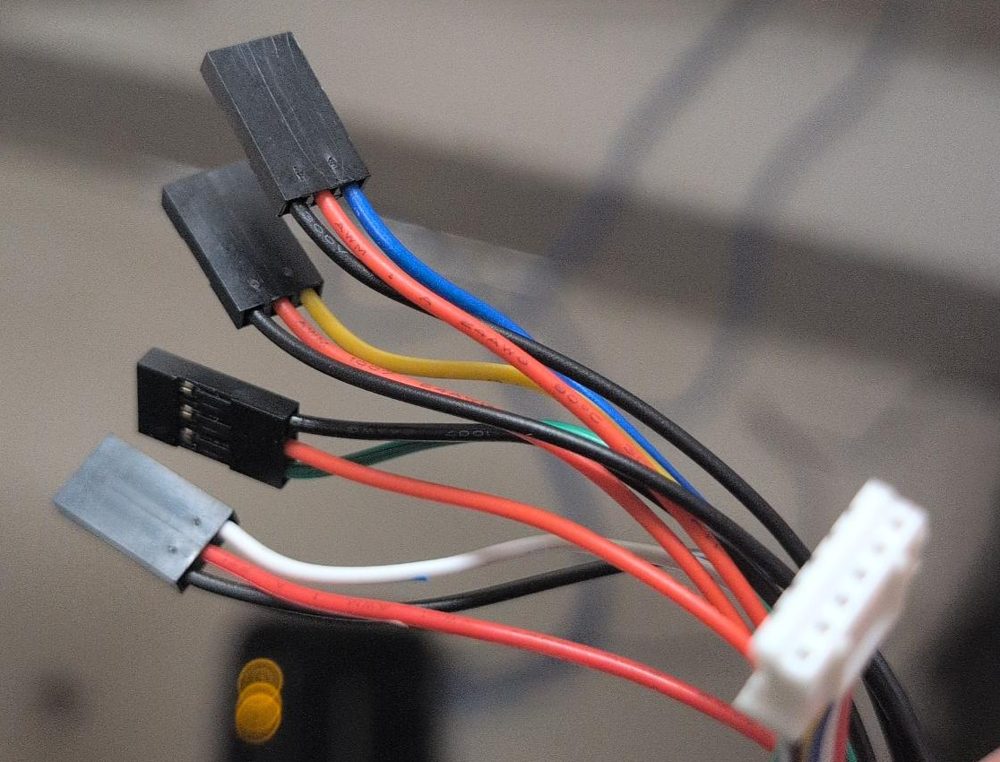
The encoder end of the cable is the white JST plug (right). The four 3-pin Dupont plugs go to the roboRIO. Each has a red wire (5 V), a black wire (ground), and one colored signal wire.
| Plug (signal wire color) | Signal | Goes to |
|---|---|---|
| Blue | Channel A | DIO 0 |
| Yellow | Channel B | DIO 1 |
| Green | Index (once per turn) | Not used. Leave it unplugged and tape it out of the way. |
| White | Absolute position | Not used in these labs. Leave it unplugged and tape it out of the way. |
Which way around? Each roboRIO DIO port is three pins in a row, and the roboRIO has a label printed next to each row of pins: the ground symbol (⏚), V (5 V), and S (signal). Turn each plug so the black wire is on ground (⏚), the red wire is on V, and the blue or yellow wire is on S. Every plug on this cable has its own red and black, so each one powers itself; that's normal. The drive encoders from Lab 8 are already on DIO 2 to 5, so the elevator uses 0 and 1. (Lesson 4.3 has more.)
The big idea: goal, setpoint, and holding against gravity#
A plain PIDController sees a big error the instant you pick a new height and shoves the carriage at it as hard as it can. A ProfiledPIDController plans the move first: speed up gently, cruise, slow down, arrive (Lesson 14).
| What it is | Example | |
|---|---|---|
| Goal | The preset you picked | L2, 0.25 m |
| Setpoint | Where the profile says the carriage should be right now, on its way to the goal | 0.11 m, moving up at 0.25 m/s |
| Height | Where the encoder says the carriage actually is | 0.10 m |
Every 20 ms the setpoint takes a small step toward the goal, and PID only has to close the small gap between the setpoint and the height.
The elevator also needs voltage just to stand still, because gravity is always pulling the carriage down. So the controller can never simply stop when it arrives. This elevator works like this:
- A hold command runs all the time as the default command, following the profile toward the goal and holding the goal once it gets there.
- A preset command sets a new goal, drives toward it, and finishes when it arrives. Then the hold command takes over and keeps holding that same goal.
Step 1: Constants#
Add this class inside Constants in the WestCoastDrive project, and add import edu.wpi.first.math.util.Units; at the top of the file. Fill in your CAN ID, DIO ports, and your sprocket's pitch diameter. You'll find MaxHeightMeters in Step 5.
  public static class kElevatorConstants {
    // Motor
    public static final int MotorCanId = 5;
    public static final boolean MotorInverted = false;
    public static final int CurrentLimit = 40;              // amps
    public static final double MaxVolts = 4.0;              // gentle while tuning

    // Through Bore Encoder, on the same shaft as the sprocket
    public static final int EncoderChannelA = 0;
    public static final int EncoderChannelB = 1;
    public static final boolean EncoderInverted = false;
    public static final int EncoderCyclesPerRev = 2048;     // NOT 8192: see below

    // Sprocket: one turn moves the chain (and the carriage) one circumference
    public static final double PitchDiameterInches = 1.432; // from your sprocket's spec sheet
    public static final double PitchDiameterMeters = Units.inchesToMeters(PitchDiameterInches);
    public static final double MetersPerRevolution = Math.PI * PitchDiameterMeters;
    public static final double DistancePerPulse = MetersPerRevolution / EncoderCyclesPerRev;

    // Travel limits
    public static final double MinHeightMeters = 0.0;       // bottom
    public static final double MaxHeightMeters = 0.5;       // you'll measure this in Step 5

    // Presets, in meters (pick your own in Step 6)
    public static final double StartMeters = 0.02;
    public static final double L2Meters = 0.25;
    public static final double L3Meters = 0.45;

    // PID, in volts per meter of error
    public static final double kP = 10.0;
    public static final double kI = 0.0;
    public static final double kD = 0.0;
    public static final double ToleranceMeters = 0.006;     // within 6 mm counts as "there"
    public static final double IZoneMeters = 0.063;         // only build up I within 6.3 cm

    // Motion profile limits
    public static final double MaxVelocityMetersPerSecond = 0.25;
    public static final double MaxAccelerationMetersPerSecondSquared = 0.5;
  }
Where DistancePerPulse comes from. When the sprocket turns once, the chain moves one circumference of the sprocket, measured at its pitch diameter (the circle through the middle of the chain's pins, not the outside of the teeth):
meters per revolution = π × pitch diameter
distance per pulse    = meters per revolution ÷ 2048
With a 1.432 in pitch diameter: π × 1.432 in = 4.50 in = 0.114 m per turn. The sprocket's spec sheet lists its pitch diameter. If there's gearing between the encoder and the sprocket, divide by that ratio too.
2048, not 8192
The Through Bore Encoder reports 8192 counts per turn with 4X decoding, so it's tempting to divide by 8192. Don't. WPILib's Encoder already accounts for 4X decoding, and the WPILib docs say each "pulse" in setDistancePerPulse is always one full cycle (four edges): 2048 for the Through Bore. Dividing by 8192 makes every height read 4 times too small.
Step 2: The elevator subsystem#
Create subsystems/ElevatorSubsystem.java:
package frc.robot.subsystems;

import com.revrobotics.PersistMode;
import com.revrobotics.ResetMode;
import com.revrobotics.spark.SparkLowLevel.MotorType;
import com.revrobotics.spark.SparkMax;
import com.revrobotics.spark.config.SparkBaseConfig.IdleMode;
import com.revrobotics.spark.config.SparkMaxConfig;

import edu.wpi.first.math.MathUtil;
import edu.wpi.first.math.controller.ProfiledPIDController;
import edu.wpi.first.math.trajectory.TrapezoidProfile;
import edu.wpi.first.wpilibj.CounterBase.EncodingType;
import edu.wpi.first.wpilibj.DriverStation;
import edu.wpi.first.wpilibj.Encoder;
import edu.wpi.first.wpilibj2.command.Command;
import edu.wpi.first.wpilibj2.command.SubsystemBase;

import frc.robot.Constants.kElevatorConstants;
import frc.robot.telemetry.Telemetry;
import frc.robot.telemetry.TelemetryTable;
import frc.robot.telemetry.TunableDouble;
import frc.robot.telemetry.Tunables;

public class ElevatorSubsystem extends SubsystemBase {
  /** The heights the operator can pick. */
  public enum Preset { START, L2, L3 }

  // The NEO is BRUSHLESS (the drivetrain CIMs are brushed)
  private final SparkMax m_motor =
      new SparkMax(kElevatorConstants.MotorCanId, MotorType.kBrushless);

  private final Encoder m_encoder = new Encoder(
      kElevatorConstants.EncoderChannelA,
      kElevatorConstants.EncoderChannelB,
      kElevatorConstants.EncoderInverted,
      EncodingType.k4X);

  // PID that follows a motion profile: it plans a smooth path to the goal,
  // then uses PID to follow that path.
  private final ProfiledPIDController m_pid = new ProfiledPIDController(
      kElevatorConstants.kP, kElevatorConstants.kI, kElevatorConstants.kD,
      new TrapezoidProfile.Constraints(
          kElevatorConstants.MaxVelocityMetersPerSecond,
          kElevatorConstants.MaxAccelerationMetersPerSecondSquared));

  private double m_lastVolts = 0.0;      // for the dashboard

  // Values go to /Telemetry/Elevator. The gains and limits are tunable (/Tunables/Elevator) while you test.
  private final TelemetryTable m_telemetry = Telemetry.getTable("Elevator");
  private final TunableDouble m_kP = Tunables.addDouble("Elevator/kP", kElevatorConstants.kP);
  private final TunableDouble m_kI = Tunables.addDouble("Elevator/kI", kElevatorConstants.kI);
  private final TunableDouble m_kD = Tunables.addDouble("Elevator/kD", kElevatorConstants.kD);
  private final TunableDouble m_maxVelocity =
      Tunables.addDouble("Elevator/Max Velocity (m per s)", kElevatorConstants.MaxVelocityMetersPerSecond);
  private final TunableDouble m_maxAcceleration =
      Tunables.addDouble("Elevator/Max Accel (m per s2)", kElevatorConstants.MaxAccelerationMetersPerSecondSquared);

  public ElevatorSubsystem() {
    SparkMaxConfig config = new SparkMaxConfig();
    config.smartCurrentLimit(kElevatorConstants.CurrentLimit);
    config.idleMode(IdleMode.kBrake);    // resists falling when no voltage is applied
    config.inverted(kElevatorConstants.MotorInverted);
    m_motor.configure(config, ResetMode.kResetSafeParameters, PersistMode.kPersistParameters);

    // After this, getDistance() is in meters of elevator travel
    m_encoder.setDistancePerPulse(kElevatorConstants.DistancePerPulse);
    m_encoder.reset();   // the elevator MUST start at the bottom: this is height 0

    m_pid.setTolerance(kElevatorConstants.ToleranceMeters);
    m_pid.setIZone(kElevatorConstants.IZoneMeters);
    holdHere();
  }

  public double getHeightMeters() {
    return m_encoder.getDistance();
  }

  /** True when the carriage has reached the GOAL, not just the profile's current step. */
  public boolean atGoal() {
    return m_pid.atGoal();
  }

  /** Every voltage goes through here, so the soft limits can't be skipped. */
  private void setVolts(double volts) {
    double height = getHeightMeters();
    if (height >= kElevatorConstants.MaxHeightMeters && volts > 0) {
      volts = 0;   // at the top: never push higher
    }
    if (height <= kElevatorConstants.MinHeightMeters && volts < 0) {
      volts = 0;   // at the bottom: never push lower
    }
    m_lastVolts = volts;
    m_motor.setVoltage(volts);
  }

  /** Starts a fresh profile from where the carriage is right now, with the goal right here. */
  private void holdHere() {
    m_pid.reset(getHeightMeters());
    m_pid.setGoal(getHeightMeters());
  }

  /** Picks a new goal. The profile plans a smooth path from where the carriage is now. */
  private void setGoalMeters(double meters) {
    m_pid.reset(getHeightMeters(), m_encoder.getRate());
    m_pid.setGoal(MathUtil.clamp(
        meters, kElevatorConstants.MinHeightMeters, kElevatorConstants.MaxHeightMeters));
  }

  private static double presetMeters(Preset preset) {
    return switch (preset) {
      case START -> kElevatorConstants.StartMeters;
      case L2 -> kElevatorConstants.L2Meters;
      case L3 -> kElevatorConstants.L3Meters;
    };
  }

  /** One step: move the setpoint along the profile, then PID toward it. */
  private void followProfile() {
    double volts = m_pid.calculate(getHeightMeters());
    setVolts(MathUtil.clamp(volts, -kElevatorConstants.MaxVolts, kElevatorConstants.MaxVolts));
  }

  // ---------------------------------------------------------------- Commands

  /** The default command: follow the profile to the goal, then hold it. Never ends. */
  public Command holdCommand() {
    return run(this::followProfile).withName("Hold");
  }

  /** Sets a new goal and drives to it. Ends on arrival; then Hold keeps it there. */
  public Command goToPresetCommand(Preset preset) {
    return run(this::followProfile)
        .beforeStarting(() -> setGoalMeters(presetMeters(preset)))
        .until(this::atGoal)
        .withName("Elevator to " + preset);
  }

  /** Manual control while held. When released, hold wherever the carriage is. */
  public Command manualCommand(double volts) {
    return runEnd(() -> setVolts(volts), this::holdHere)
        .withName("Manual " + volts + " V");
  }

  /** Call this height 0. Only use it when the elevator is all the way down. */
  public Command zeroCommand() {
    return runOnce(() -> {
      m_encoder.reset();
      holdHere();
    }).ignoringDisable(true).withName("Zero");
  }

  @Override
  public void periodic() {
    // While disabled, keep the profile and goal on the real height,
    // so enabling never makes the elevator suddenly jump.
    if (DriverStation.isDisabled()) {
      holdHere();
    }

    // Use whatever gains and limits are on the dashboard right now
    m_pid.setPID(m_kP.get(), m_kI.get(), m_kD.get());
    m_pid.setConstraints(new TrapezoidProfile.Constraints(
        m_maxVelocity.get(), m_maxAcceleration.get()));

    m_telemetry.log("Height (m)", getHeightMeters());
    m_telemetry.log("Goal (m)", m_pid.getGoal().position);
    m_telemetry.log("Setpoint (m)", m_pid.getSetpoint().position);
    m_telemetry.log("Setpoint Velocity (m per s)", m_pid.getSetpoint().velocity);
    m_telemetry.log("Error (m)", m_pid.getGoal().position - getHeightMeters());
    m_telemetry.log("Output (V)", m_lastVolts);
    m_telemetry.log("Current (A)", m_motor.getOutputCurrent());
    m_telemetry.log("At Goal", atGoal());
  }
}
The elevator subsystem, piece by piece#
It's the longest file in the labs, but most of it is pieces you already know. Here it is in order.
1. The presets#
public enum Preset { START, L2, L3 }
An enum is a type with a fixed list of values. A Preset can only be START, L2, or L3. If you type Preset.L4 by mistake, the code won't build, which is much better than an elevator going to a height you didn't mean. It's public and inside the class, so RobotContainer uses it as ElevatorSubsystem.Preset.L2.
2. The motor and the encoder#
private final SparkMax m_motor =
    new SparkMax(kElevatorConstants.MotorCanId, MotorType.kBrushless);

private final Encoder m_encoder = new Encoder(
    kElevatorConstants.EncoderChannelA,
    kElevatorConstants.EncoderChannelB,
    kElevatorConstants.EncoderInverted,
    EncodingType.k4X);
The same patterns as Labs 1 and 6: a NEO on a SPARK MAX in brushless mode, and the Through Bore Encoder on two DIO ports with 4X counting.
3. The controller#
private final ProfiledPIDController m_pid = new ProfiledPIDController(
    kElevatorConstants.kP, kElevatorConstants.kI, kElevatorConstants.kD,
    new TrapezoidProfile.Constraints(
        kElevatorConstants.MaxVelocityMetersPerSecond,
        kElevatorConstants.MaxAccelerationMetersPerSecondSquared));
Like Lab 9's PIDController, it takes kP, kI, and kD. It also takes constraints: the fastest the carriage may move (0.25 m/s) and how quickly it may speed up or slow down (0.5 m/s²). The controller uses those to plan the smooth path from where the carriage is to the goal.
TrapezoidProfile.Constraints is named for the shape of the plan: speed ramps up, stays flat, and ramps down, which looks like a trapezoid on a graph (Lesson 14).
4. The dashboard and the tunable numbers#
private double m_lastVolts = 0.0;      // for the dashboard

private final TelemetryTable m_telemetry = Telemetry.getTable("Elevator");
private final TunableDouble m_kP = Tunables.addDouble("Elevator/kP", kElevatorConstants.kP);
// ...kI, kD, Max Velocity, and Max Accel the same way
Values go to Telemetry → Elevator. Five numbers are tunable from Tunables → Elevator: the three gains and the two profile limits.
5. The constructor#
SparkMaxConfig config = new SparkMaxConfig();
config.smartCurrentLimit(kElevatorConstants.CurrentLimit);
config.idleMode(IdleMode.kBrake);    // resists falling when no voltage is applied
config.inverted(kElevatorConstants.MotorInverted);
m_motor.configure(config, ResetMode.kResetSafeParameters, PersistMode.kPersistParameters);

m_encoder.setDistancePerPulse(kElevatorConstants.DistancePerPulse);
m_encoder.reset();   // the elevator MUST start at the bottom: this is height 0

m_pid.setTolerance(kElevatorConstants.ToleranceMeters);
m_pid.setIZone(kElevatorConstants.IZoneMeters);
holdHere();
| Line | What it does |
|---|---|
idleMode(IdleMode.kBrake) |
When no voltage is applied, the motor resists turning. It slows a falling carriage, but doesn't hold it up by itself. |
setDistancePerPulse(DistancePerPulse) |
After this, getDistance() answers in meters of elevator travel (Step 1) |
m_encoder.reset() |
Calls wherever the elevator is right now 0 m. That's why it must start at the bottom. |
setTolerance(0.006) |
Within 6 mm counts as "there" |
setIZone(0.063) |
Only build up I within 6.3 cm of the goal (Attempt 4) |
holdHere() |
Starts the controller off holding the current height (piece 8) |
6. Reading the height#
public double getHeightMeters() {
  return m_encoder.getDistance();
}

public boolean atGoal() {
  return m_pid.atGoal();
}
atGoal() is true when the carriage has reached the goal you picked. (atSetpoint() only checks the profile's current step, which would be true the whole way up.)
7. Every voltage goes through one method, with soft limits#
private void setVolts(double volts) {
  double height = getHeightMeters();
  if (height >= kElevatorConstants.MaxHeightMeters && volts > 0) {
    volts = 0;   // at the top: never push higher
  }
  if (height <= kElevatorConstants.MinHeightMeters && volts < 0) {
    volts = 0;   // at the bottom: never push lower
  }
  m_lastVolts = volts;
  m_motor.setVoltage(volts);
}
| Line | What it does |
|---|---|
if (height >= Max && volts > 0) |
At or above the top and trying to go up? && means both must be true. |
volts = 0; |
Then don't. Pushing down from the top is still allowed. |
The second if |
The same check for the bottom |
Every command moves the motor through setVolts, so no command can skip these checks. These are soft limits: limits in code, as opposed to the hard stop, the metal the carriage hits.
8. Starting a fresh plan#
private void holdHere() {
  m_pid.reset(getHeightMeters());
  m_pid.setGoal(getHeightMeters());
}

private void setGoalMeters(double meters) {
  m_pid.reset(getHeightMeters(), m_encoder.getRate());
  m_pid.setGoal(MathUtil.clamp(
      meters, kElevatorConstants.MinHeightMeters, kElevatorConstants.MaxHeightMeters));
}
| Method | What it does |
|---|---|
holdHere() |
Throws away the old plan, starts a new one from the real height, and makes that same height the goal: "stay right here" |
setGoalMeters(meters) |
Starts a new plan from the real height and speed (getRate()), toward a new goal |
MathUtil.clamp(meters, Min, Max) |
If a goal is outside the elevator's travel, use the nearest end instead |
reset(...) matters because the profile plans from wherever it thinks the carriage is. If that's out of date (after manual driving, or after being disabled), the first step of the plan would be far from reality, and the elevator would jump.
9. Turning a preset into meters#
private static double presetMeters(Preset preset) {
  return switch (preset) {
    case START -> kElevatorConstants.StartMeters;
    case L2 -> kElevatorConstants.L2Meters;
    case L3 -> kElevatorConstants.L3Meters;
  };
}
A switch expression picks one value based on which preset it's given: "if it's START, the answer is StartMeters; if it's L2, L2Meters..." Java checks that every preset is covered, so if you add L4 to the enum and forget it here, the build tells you.
10. One step of control#
private void followProfile() {
  double volts = m_pid.calculate(getHeightMeters());
  setVolts(MathUtil.clamp(volts, -kElevatorConstants.MaxVolts, kElevatorConstants.MaxVolts));
}
m_pid.calculate(height) does two things in one call: it moves the setpoint one 20 ms step along the plan toward the goal, then runs PID on the gap between the setpoint and the height. The answer, clamped to ±4 V, goes to setVolts. Every command that moves the elevator by itself calls this once per loop.
11. The commands#
public Command holdCommand() {
  return run(this::followProfile).withName("Hold");
}
The default command. Every loop, follow the plan, and once at the goal, keep holding it. It never ends, because the elevator always needs voltage to fight gravity.
public Command goToPresetCommand(Preset preset) {
  return run(this::followProfile)
      .beforeStarting(() -> setGoalMeters(presetMeters(preset)))
      .until(this::atGoal)
      .withName("Elevator to " + preset);
}
| Part | What it does |
|---|---|
.beforeStarting(...) |
Once, right before the first loop: set the new goal |
run(this::followProfile) |
Every loop: follow the plan |
.until(this::atGoal) |
End on arrival. Then the default Hold command starts again and keeps holding the same goal. |
Because it ends, an auto routine can chain it: goToPresetCommand(Preset.L2).andThen(...).
public Command manualCommand(double volts) {
  return runEnd(() -> setVolts(volts), this::holdHere)
      .withName("Manual " + volts + " V");
}
While the button is held, apply a fixed voltage (still through the soft limits). When it's released, holdHere() makes wherever the carriage stopped the new goal, so it holds there instead of sliding back to the old goal.
public Command zeroCommand() {
  return runOnce(() -> {
    m_encoder.reset();
    holdHere();
  }).ignoringDisable(true).withName("Zero");
}
Calls the current height 0, then starts a fresh plan from there. It works while disabled, so you can lower the carriage by hand and zero it.
12. periodic(): safety, tuning, and the dashboard#
if (DriverStation.isDisabled()) {
  holdHere();
}

m_pid.setPID(m_kP.get(), m_kI.get(), m_kD.get());
m_pid.setConstraints(new TrapezoidProfile.Constraints(
    m_maxVelocity.get(), m_maxAcceleration.get()));

m_telemetry.log("Height (m)", getHeightMeters());
m_telemetry.log("Goal (m)", m_pid.getGoal().position);
m_telemetry.log("Setpoint (m)", m_pid.getSetpoint().position);
// ...setpoint velocity, error, output, current, and At Goal
| Part | What it does |
|---|---|
if (DriverStation.isDisabled()) holdHere(); |
While disabled, keep the plan and goal on the real height. Someone might push the carriage by hand; when you enable, it holds right there instead of lurching back. |
setPID(...) and setConstraints(...) |
Copy the tunable numbers from the dashboard into the controller every loop |
m_pid.getGoal().position |
The preset you picked |
m_pid.getSetpoint().position and .velocity |
Where the plan says the carriage should be right now, and how fast it should be moving |
Three safety features are built in:
| Feature | What it protects against |
|---|---|
Soft limits in setVolts |
Code that asks for a height above the top or below the bottom. The motor won't push past either end. |
Goal clamping in setGoalMeters |
A typo like L3Meters = 4.5 (4.5 meters!) just becomes "go to the top." |
| Profile and goal follow the height while disabled | Enabling with an old goal, which would make the elevator lurch the instant you enable |
Step 3: Bind the operator controller#
In RobotContainer.java, add the subsystem and a second controller:
  private final ElevatorSubsystem m_elevator = new ElevatorSubsystem();
  private final CommandXboxController m_operator = new CommandXboxController(1);
In configureBindings(), keep the drive bindings and add:
    // ---- Elevator (operator controller, slot 1) ----
    m_elevator.setDefaultCommand(m_elevator.holdCommand());

    m_operator.povUp().whileTrue(m_elevator.manualCommand(2.0));     // manual up
    m_operator.povDown().whileTrue(m_elevator.manualCommand(-1.0));  // manual down (gravity helps)
    m_operator.back().onTrue(m_elevator.zeroCommand());

    // Presets: you'll add these in Step 6
Manual down uses less voltage than manual up, because gravity is already pulling the carriage down.
Step 4: Check directions and the scale#
Deploy with the elevator all the way down. In Elastic, add Height (m) from Telemetry → Elevator.
Direction:
- Enable. Hold D-pad up for a moment, gently.
- The carriage must go up, and Height must increase.
| What you see | Fix |
|---|---|
| Carriage doesn't move at 2 V | Gravity is stronger than 2 V. Try 3 V (stay at or under MaxVolts). |
| Carriage goes down on D-pad up | Set MotorInverted = true |
| Carriage goes up, but Height decreases | Set EncoderInverted = true |
Don't continue until both directions are right.
Scale: check that the pitch diameter math matches the real elevator.
- Lower the elevator to the bottom and press Back (zero).
- Use D-pad up to raise it partway. Disable.
- Measure how far the carriage rose with a tape measure, in meters (or inches × 0.0254).
- Compare it with Height on the dashboard. They should match within about a centimeter.
| What you see | Likely cause |
|---|---|
| Height is about 4 times too small | DistancePerPulse divides by 8192 instead of 2048 |
| Height is off by some other steady ratio | Wrong pitch diameter, gearing between the encoder and the sprocket, or a cascade elevator (where the top stage moves faster than the chain) |
If it's off and you can't find why, scale it from your measurement: change MetersPerRevolution to MetersPerRevolution × (tape measure ÷ Height).
Step 5: Find the top#
Use D-pad up to raise the elevator slowly toward the top. Stop a few centimeters before the hard stop and read Height. Set MaxHeightMeters to that number, minus 2 to 3 cm of safety margin. Deploy.
Now hold D-pad up near the top. The soft limit should stop the motor just below your max.
Step 6: Preset heights#
Pick three heights between 0 and your max, and put them in StartMeters, L2Meters, and L3Meters. Then bind them. Add import frc.robot.subsystems.ElevatorSubsystem.Preset; at the top of RobotContainer:
    m_operator.a().onTrue(m_elevator.goToPresetCommand(Preset.START));
    m_operator.b().onTrue(m_elevator.goToPresetCommand(Preset.L2));
    m_operator.y().onTrue(m_elevator.goToPresetCommand(Preset.L3));
Set up Elastic for tuning: one Graph with Goal, Setpoint, and Height together, plus Text Display widgets for kP, kI, kD, Max Velocity, and Max Accel, and Error and Output (V).
Press B. Watch the graph: Goal jumps to L2, Setpoint ramps smoothly up to it, and Height follows the setpoint.
Attempt 1: P only, and the sag#
With kI and kD at 0 and kP = 10, press B (L2) and let it settle.
What you'll see: The carriage follows the setpoint a little below it the whole way up, then settles below the goal and stays there. That gap is sag, and gravity causes it.
Here's why. To hold the carriage still, the motor needs some voltage, call it the hold voltage. P only makes voltage when there's error:
volts = kP × error
So the carriage sinks until the error is just big enough to make the hold voltage:
sag = hold voltage ÷ kP
Measure it. Fill in this table, waiting for the elevator to settle each time:
| kP | Sag (Error, m) | Output (V) while holding | kP × sag |
|---|---|---|---|
| 10 | |||
| 20 | |||
| 40 |
The last column should come out about the same every time. That number is your elevator's hold voltage: what it costs to fight gravity.
Think about it
Doubling kP cuts the sag in half. Why can't you just make kP huge to get rid of the sag?
Attempt 2: Higher P, and the bounce#
Keep raising kP in Elastic (Tunables → Elevator). Move between presets A, B, and Y.
What you'll see: The sag shrinks. Because the profile slows the setpoint down before the goal, there's much less overshoot than a plain PID would have, but with very high kP the carriage starts to jitter or bounce around the setpoint. Moving down usually bounces more than moving up: on the way down, gravity is helping the motor.
Back kP off to the highest value that doesn't bounce badly.
Attempt 3: Add D to stop the bounce#
Raise kD in small steps (try 0.5, then 1.0, then 2.0) until the bounce settles. If the motor starts to buzz, kD is too high.
With D tamping down the bounce, you can usually raise kP a bit more, which shrinks the sag further. But the sag never completely goes away.
Attempt 4: Add I to get rid of the sag#
This is where I earns its place. While the carriage sits below the goal, the integral keeps adding up that error, so the voltage keeps rising until it's exactly the hold voltage, and the error goes to zero.
- Set kI small, like 2. Press B.
- Watch the graph: the carriage arrives a little low, then creeps up to the goal over a second or two.
- Watch Output (V) as it creeps. It climbs until it reaches about the hold voltage you measured in Attempt 1.
- Raise kI until the creep is quick but doesn't overshoot. Too much kI makes the carriage slowly swing above and below the goal.
Why the IZone matters here
During a long move from START to L3, the carriage trails the setpoint the whole way. Without a limit, I would pile up that error on the way and fling the carriage past L3. setIZone(0.063) only lets I build up within 6.3 cm, where it's needed for the last bit.
Attempt 5: Speed up the profile#
The profile limits are tunable too. Raise Max Velocity and Max Accel in Elastic a little at a time, and move between presets.
What you'll see: Moves get faster. Then, at some point, Height falls further and further behind Setpoint during the move, and overshoots at the end. That's the motor running out of power: the profile is asking for more than the elevator can do (or more than MaxVolts allows). Back the limits off to where Height stays close to Setpoint.
Attempt 6: Put it all together#
With your best gains and limits:
- Move START → L3 → L2 → START. Every preset should arrive smoothly, without much bounce, and settle exactly on the goal.
- Carefully set a light object (like a bag of small parts) on the carriage while it holds at L2. Watch it dip, then watch I bring it back to the goal. Remove it, and watch it recover the other way.
- Copy your gains and limits into
Constants(dashboard edits are lost on reboot).
Scorecard#
| Gains | Arrives in (s) | Overshoot (m) | Error after settling (m) | Holds with weight? |
|---|---|---|---|---|
| P only | ||||
| P + D | ||||
| P + I + D | ||||
| P + I + D, faster profile |
Commit#
git add .
git commit -m "Lab 10: elevator position control"
When it doesn't work#
| Problem | Likely cause |
|---|---|
| Elevator runs away upward and stops at the soft limit | Motor and encoder directions disagree. Redo the direction check in Step 4. |
| Elevator doesn't move when you press a preset | kP is too small to overcome gravity, or the preset is outside the min/max limits |
| Elevator falls a little after a preset command finishes | The default hold command isn't set |
| Elevator lurches the instant you enable | The disabled check in periodic() is missing |
| Every height is 4 times too small | DistancePerPulse divides by 8192 instead of 2048 |
| Height falls far behind Setpoint during moves | Max Velocity or Max Accel is too high for the elevator |
| Heights are all wrong after a restart | The elevator wasn't at the bottom when the robot turned on. Lower it and press Back. |
| Slow swinging above and below the target | I is too high |
| Big overshoot on long moves only | IZone is too big or missing, or the profile is too fast |
Finished code
Stuck, or missed a lab? lab10-elevator on GitHub is the complete project as it looks at the end of this lab. It's a full WPILib 2026 project you can open in VS Code, build, and deploy. Try to finish the lab yourself first.
Try it#
- Work out
DistancePerPulsefrom your sprocket's pitch diameter, and check it with a tape measure - Find the top and set a safe
MaxHeightMeters - Fill in the sag table for three values of P and find your hold voltage
- Tune P, then D, then I, then the profile limits, and fill in the scorecard
- Do the weight test with P only, then with P + I + D. What's different?
- Add a fourth preset,
L4, to the enum,presetMeters, and the right bumper - Make the WCD's auto raise the elevator to L2, drive forward, then lower it to START.
goToPresetCommandends when it arrives, so you can chain it with.andThen(...). - Challenge: if the elevator has a bottom limit switch, make it re-zero the encoder automatically whenever it's pressed (Lab 4)
Check yourself#
What's the difference between the goal and the setpoint?
The goal is the preset you picked. The setpoint is where the profile says the carriage should be right now; it moves toward the goal a little every 20 ms.
The preset command ends when it arrives. Why doesn't the carriage fall?
The hold command is the default command, so it starts again as soon as the preset command ends, and keeps holding the same goal.
Why does setGoalMeters call m_pid.reset(...) first?
So the profile starts from where the carriage really is, moving at its real speed. Otherwise it could plan from an old position and make the carriage jump.
Your sprocket's pitch diameter is 1.757 in. How far does the carriage move per turn?
π × 1.757 in ≈ 5.52 in ≈ 0.140 m
Why is DistancePerPulse divided by 2048 and not 8192?
WPILib's Encoder already accounts for 4X decoding. setDistancePerPulse always wants distance per full cycle, and the Through Bore has 2048 cycles per turn.
With P only, why does the elevator settle below the goal?
P only makes voltage when there's error. Holding the carriage up takes voltage, so the carriage sinks until the error is big enough to make it: sag = hold voltage ÷ kP.
The hold voltage is 0.8 V and kP = 20. How much does the elevator sag with P only?
0.8 ÷ 20 = 0.04 m (4 cm)
Why does I remove the sag when P alone can't?
I keeps adding up the error for as long as it lasts, so its output keeps growing until it supplies the hold voltage by itself, and the error reaches zero.
Why does moving down tend to overshoot more than moving up?
Going down, gravity helps the motor, so the carriage speeds up more and carries more momentum into the target.
What are the soft limits in setVolts for?
They refuse to push past the top or below the bottom, no matter what any command asks for.