
Lab 5: Control Speed with a Knob#
Why it matters#
A limit switch only knows two things: pressed or not. Most sensors report a range of values instead: how far, how fast, what angle. These are analog sensors.
The test bed's 10-turn potentiometer ("pot") is a knob that reports how far it's been turned. In this lab you'll read it, turn its raw reading into something useful, and use it to set the motor's speed: turn the knob one way to spin forward, the other way to spin backward, and leave it in the middle to stop.
Turning one range of numbers into another is something you'll do with almost every sensor, so this lab is about more than knobs.
Before you start: finish Lab 4. You'll add to the same TestBed project. Lesson 4.3 explains how a potentiometer works.
Read this#
Walkthrough#
How a potentiometer works#
A potentiometer has three wires. Two connect across a strip of resistive material (5 V at one end, ground at the other), and the third, the wiper, slides along the strip as you turn the knob.
| Knob position | Wiper voltage |
|---|---|
| Turned fully one way | About 0 V |
| Halfway | About 2.5 V |
| Turned fully the other way | About 5 V |
It plugs into one of the roboRIO's Analog In ports (0 to 3), which measure that voltage. Ours is a 10-turn pot: it takes ten full turns of the knob to go from one end to the other, which gives very fine control.
It has hard stops
A multi-turn pot stops at each end. Don't force it past the end, and never connect one to a motor that could drive it past the stops.
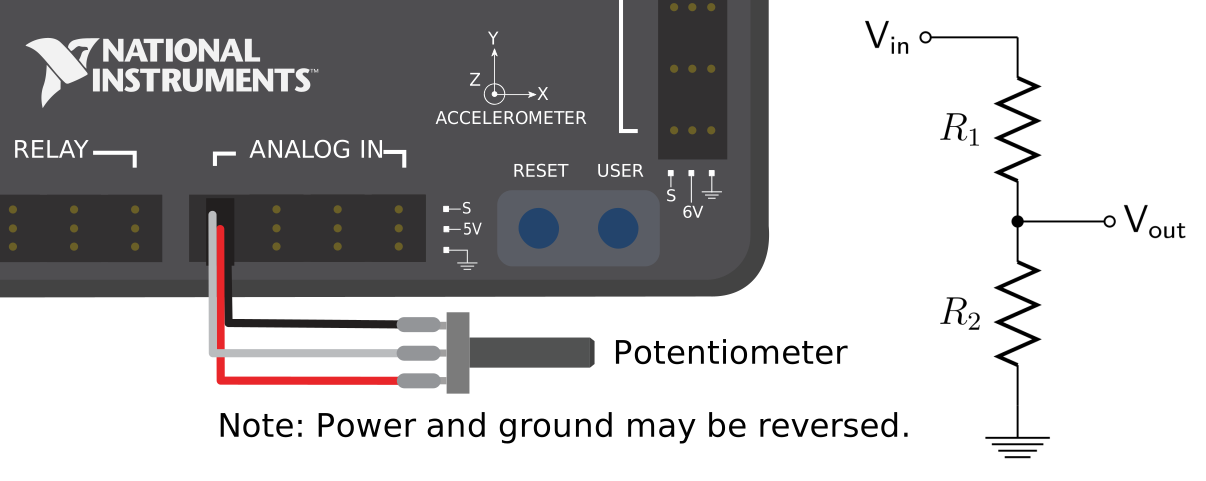
A potentiometer on an Analog In port. Swap the two outer wires to reverse which end reads 0 V. From the WPILib docs, Analog Potentiometers - Hardware (CC BY 4.0).
Step 1: Constants#
Find which Analog In port the pot is wired to, and add it to kSensorConstants:
  public static class kSensorConstants {
    public static final int LimitSwitchDio = 2;
    public static final int KnobAnalogPort = 0;    // the Analog In port your pot uses
    public static final double KnobTurns = 10.0;   // it's a 10-turn pot
  }
Step 2: Read the knob#
WPILib's AnalogPotentiometer turns the voltage into a number for you. Give it the port and the full range you want it to report. With a range of 10, it reports turns: about 0 at one end and about 10 at the other.
Open RobotContainer.java and add the knob as a field, next to the controller:
  private final AnalogPotentiometer m_knob = new AnalogPotentiometer(
      Constants.kSensorConstants.KnobAnalogPort,
      Constants.kSensorConstants.KnobTurns,
      0.0);   // offset: added to every reading
| Argument | What it means |
|---|---|
KnobAnalogPort (0) |
Which Analog In port on the roboRIO the knob is wired to |
KnobTurns (10.0) |
The full range: when the knob is turned all the way, get() reports 10. Halfway reports 5. |
0.0 |
The offset, added to every reading. 0 means "no shift." |
Import edu.wpi.first.wpilibj.AnalogPotentiometer.
Add a telemetry table for the knob's values, below the knob (import frc.robot.telemetry.Telemetry and frc.robot.telemetry.TelemetryTable):
private final TelemetryTable m_knobTelemetry = Telemetry.getTable("Knob");
Why put the knob in RobotContainer?
The knob is a control, like the Xbox controller, not part of the motor's mechanism. Controls live in RobotContainer; mechanisms live in subsystems.
Put the reading on the dashboard. RobotContainer doesn't have a periodic(), so add this line to the end of robotPeriodic() in Robot.java, after the scheduler runs:
m_robotContainer.updateDashboard();
And add the method to RobotContainer:
  /** Called every loop from Robot.robotPeriodic(). */
  public void updateDashboard() {
    m_knobTelemetry.log("Turns", m_knob.get());
  }
public void updateDashboard(): a new method you wrote.Robotcalls it every loop, so the knob's value stays fresh on the dashboard.m_knob.get()reads the knob right now, as a number of turns from 0 to 10.
Step 3: Calibrate#
Real pots almost never read exactly 0 and exactly 10 at the ends. Deploy (disabled is fine) and watch Turns in Telemetry → Knob.
- Turn the knob all the way one direction. Write down the reading: min = ______
- Turn it all the way the other direction. max = ______
- Find the middle: center = (min + max) ÷ 2 = ______
Add your numbers to kSensorConstants:
    public static final double KnobMin = 0.1;     // your measured values
    public static final double KnobMax = 9.9;
If the reading goes down when you turn the knob clockwise, that's fine. You'll decide which way is "forward" in the next step.
Step 4: Map the knob to a speed#
We want the knob's range to become a motor speed:
| Knob | Speed |
|---|---|
| min | -1.0 (full backward) |
| center | 0 (stopped) |
| max | +1.0 (full forward) |
That's a linear map: a straight line from one range onto another. Here's the math, step by step:
center    = (min + max) / 2
halfRange = (max - min) / 2
speed     = (turns - center) / halfRange
Worked example with min = 0.1 and max = 9.9:
- center = 5.0, halfRange = 4.9
- Knob at 7.45 turns: speed = (7.45 − 5.0) ÷ 4.9 = 0.5
- Knob at 2.55 turns: speed = (2.55 − 5.0) ÷ 4.9 = −0.5
Add this method to RobotContainer:
  /** Turns the knob position into a motor speed from -1 to 1. */
  private double knobToSpeed() {
    double min = Constants.kSensorConstants.KnobMin;
    double max = Constants.kSensorConstants.KnobMax;
    double center = (min + max) / 2.0;
    double halfRange = (max - min) / 2.0;

    double speed = (m_knob.get() - center) / halfRange;

    speed = MathUtil.clamp(speed, -1.0, 1.0);      // never go past full speed
    speed = MathUtil.applyDeadband(speed, 0.05);   // a small dead zone in the middle
    return speed * 0.5;                            // cap at 50% while learning
  }
Reading it from the top:
| Line | What it does |
|---|---|
private double knobToSpeed() |
A method only RobotContainer uses (private) that answers with a number (double) |
double min = ...; and double max = ...; |
Local variables: short names for the two constants, so the math below is easier to read. They only exist while the method runs. |
double center = (min + max) / 2.0; |
The knob reading that should mean "stopped" |
double halfRange = (max - min) / 2.0; |
How far the knob can turn from center to either end |
double speed = (m_knob.get() - center) / halfRange; |
The linear map: how far from center, as a fraction of the way to the end. Center gives 0, either end gives 1 or -1. |
speed = MathUtil.clamp(speed, -1.0, 1.0); |
Overwrites speed with a version that can't go below -1 or above 1 |
return speed * 0.5; |
Hands the answer back to whoever called the method |
Why the safety lines matter:
| Line | Why |
|---|---|
clamp |
If the knob reads a bit past your measured min or max, the speed still stays between -1 and 1 |
applyDeadband |
It's hard to leave a knob exactly at center. The dead zone makes "close to center" mean stopped. |
* 0.5 |
A safety cap while you test |
Add the speed to updateDashboard() so you can watch it:
m_knobTelemetry.log("Speed", knobToSpeed());
Step 5: Let the knob drive the motor#
You already wrote spinWithSupplierCommand in Lab 3. It reads a speed every loop, which is exactly what the knob needs. Bind it in configureBindings():
    // D-pad right: tap to let the knob control the motor, tap again to stop
    m_controller.povRight().toggleOnTrue(
        m_spinBrushlessMotorSubsystem.spinWithSupplierCommand(this::knobToSpeed));
this::knobToSpeed is a method reference: "call knobToSpeed() every time you need a value." (Lesson 3)
Test it:
- Set the knob to the middle. Enable.
- Tap D-pad right. The motor shouldn't move.
- Slowly turn the knob one way. The motor speeds up. Watch Speed in Telemetry → Knob.
- Turn it back through the middle and the other way. The motor slows, stops, and reverses.
- Tap D-pad right again to hand control back.
If the motor spins the "wrong" way for your taste, flip the sign: return -speed * 0.5;
Step 6: Commit#
git add .
git commit -m "Lab 5: knob controls speed"
Finished code
Stuck, or missed a lab? lab05-knob-speed on GitHub is the complete project as it looks at the end of this lab. It's a full WPILib 2026 project you can open in VS Code, build, and deploy. Try to finish the lab yourself first.
Try it#
- Calibrate the knob and record min, max, and center
- Control the motor speed with the knob
- Graph Knob/Turns with the knob sitting still. Is the reading perfectly steady, or does it wiggle a tiny bit? That wiggle is noise, and every analog sensor has some.
- Change the dead zone from 0.05 to 0.15. How does the middle feel different?
- Make a second mapping where the knob only goes forward: min = stopped, max = full speed. Bind it to D-pad left.
- Combine labs: make the knob-controlled motor stop when the limit switch from Lab 4 is pressed
Check yourself#
What's the difference between a digital and an analog sensor?
A digital sensor reports only true or false. An analog sensor reports a range of values, like a voltage from 0 to 5 V.
With min = 0.2 and max = 9.8, what speed does a knob reading of 7.4 give (before the 50% cap)?
Center = 5.0, halfRange = 4.8. Speed = (7.4 − 5.0) ÷ 4.8 = 0.5
Why calibrate instead of assuming 0 and 10?
Real pots rarely reach their exact ends. Using the real min and max makes center truly mean stopped, and makes the full range of the knob reach full speed.
Why do we clamp after mapping?
If the knob reads slightly past the measured min or max, the math would give a speed beyond ±1. Clamping keeps it in range.
Why does the knob command use this::knobToSpeed instead of knobToSpeed()?
knobToSpeed() would run once, when the robot starts, and hand over a single number. this::knobToSpeed hands over the method itself, so the command can call it every loop and follow the knob.