
Test Bed Labs#
Labs are hands-on exercises on the team's test bed: a board with real robot electronics on it, so you can write code and watch it run on real hardware without needing the competition robot.
The Lessons tab teaches the ideas. The Labs tab is where you try them on hardware.
The labs#
| Lab | Runs on | Do it after | What you'll do |
|---|---|---|---|
| Lab 0: Set Up the TestBed Project | Test bed | Lesson 0 | Install the tools, create the TestBed project, deploy it, and see your code run |
| Lab 1: Spin a Brushless Motor | Test bed | Lab 0 and a Java course | Write your first subsystem and command, and spin a motor with a button |
| Lab 1.1: Put It on the Dashboard | Test bed | Lab 1 and Lesson 6.1 | Send values with NetworkTables, build an Elastic layout, and change the speed live |
| Lab 2: Drive a West Coast Drive | WCD | Lab 1.1 | Program four CIMs with leaders, followers, and skid steer controls |
| Lab 3: Buttons and Triggers | Test bed | Lab 2 | whileTrue, onTrue, toggles, timeouts, a throttle, and default commands |
| Lab 4: Stop at a Limit Switch | Test bed | Lab 3 | Read your first sensor and stop the motor automatically |
| Lab 5: Control Speed with a Knob | Test bed | Lab 4 | Read an analog sensor, calibrate it, and map it to a speed |
| Lab 6: Count Turns with an Encoder | Test bed | Lab 5 | Read an encoder, then try to turn exactly 10 times with timing and bang-bang |
| Lab 7: Timed Autonomous | WCD | Lab 6 | Drive a pattern on its own, picked from a dashboard menu |
| Lab 8: Gyro Turns and Encoder Distances | WCD | Lab 7 | Turn by angle with the NavX2, drive exact distances with the drive encoders, and close the square |
| Lab 9: PID on the Wheel | Test bed | Lab 8 and Lesson 12 | Turn exactly 10 times with P, then D, then I |
| Lab 10: Elevator Position Control | WCD | Lab 9 | Move the elevator between START, L2, and L3 with a ProfiledPIDController, in meters, and hold against gravity |
| Lab 11: Track the Robot on the Field | WCD | Lab 10 and Lesson 17 | Add odometry, watch the robot move on a field map in Elastic, and calibrate it against a tape measure |
Do them in order. Each lab adds one new idea. Every lab has finished code on GitHub, in the examples folder: a complete project you can open and deploy if you get stuck.
Each lab adds one new idea. Labs on the test bed build up the TestBed project from Lab 0. Labs on the WCD build up the WestCoastDrive project from Lab 2. Commit your work to Git after each lab.
What's on the test bed#
New to any of this hardware? Lesson 4 covers the electrical system, and Lessons 4.1 (motors), 4.2 (SPARK MAX), and 4.3 (sensors) cover each part below.
| Part | What it does |
|---|---|
| roboRIO | The robot's computer. Your code runs here. |
| Power distribution with breakers | Splits battery power to everything, with a breaker on each channel |
| Main breaker and battery | Power on and off, and the emergency off switch |
| Two SPARK MAX motor controllers | Drive the motors, connected to the roboRIO over CAN. The brushless motor's is CAN ID 8. |
| 775pro motor with a gearbox and wheel | The motor used in Labs 6 and 9 |
| NEO brushless motor | The motor used in Labs 1, 1.1, 3, 4, and 5 |
| REV Through Bore Encoder (quadrature) | Measures how far the wheel has turned (Labs 6 and 9) |
| Limit switches | On/off sensors (Lab 4) |
| 10-turn potentiometer | A knob that reports its position as an analog voltage (Lab 5) |
The test bed has no radio. Connect your laptop to the roboRIO with an Ethernet or USB cable.
The West Coast Drive#
Labs 2, 7, 8, and 10 use the team's West Coast Drive, a six-wheel, skid steer drivetrain on its own robot frame, with an elevator on top.
| Part | Details |
|---|---|
| Motors | 4 CIM motors (brushed), 2 per side, each pair in one gearbox |
| Motor controllers | 4 SPARK MAXes on CAN, in brushed mode |
| Wheels | 3 per side, chained together, with the center wheels slightly lower |
| Gyro | NavX2 on the roboRIO's MXP port (Lab 8) |
| Drive encoders | A REV Through Bore Encoder on each gearbox output shaft, on the roboRIO's DIO ports (Lab 8) |
| Wheels | 6 in |
| Elevator | A NEO on a SPARK MAX in brushless mode, with a REV Through Bore Encoder on the roboRIO's DIO ports (Lab 10) |
| Radio | Labeled 4674-6. The Driver Station connects through it. |
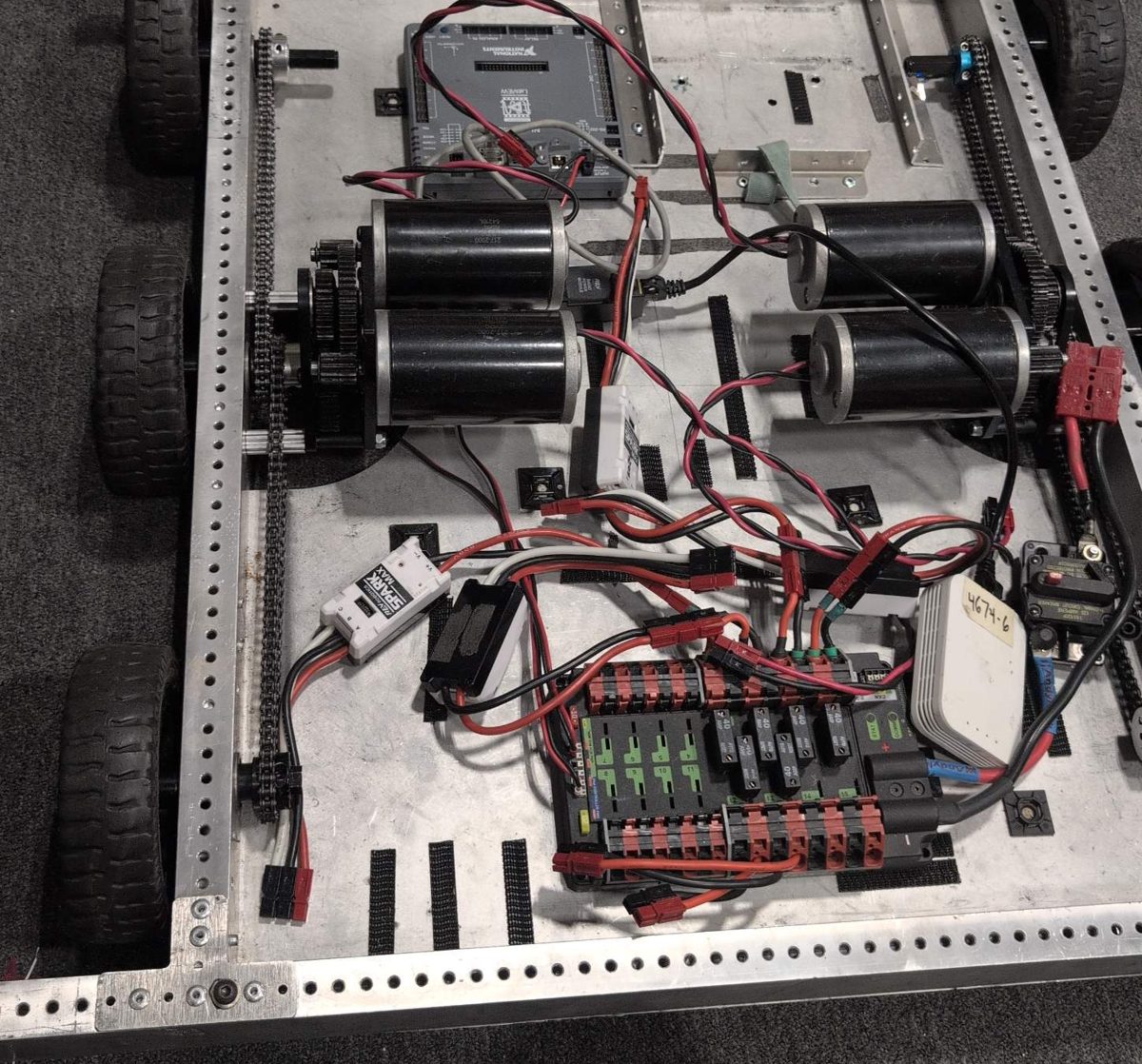
The RoboJacks West Coast Drive chassis, before the elevator goes on. Front is at the top of the photo.
WCD safety
Test new drive code on blocks first, with the wheels off the ground. On the floor, use a big open space, keep people out of the robot's path, and start at low speed. Keep hands out of the elevator, and never reach under a raised carriage.
Test bed rules#
Safety
- Say "Enabling!" out loud before you enable, and wait until hands are clear.
- Keep fingers, hair, and loose sleeves away from the wheel.
- Never hold a motor still while it's pushing. The 775pro burns out if it stalls.
- In autonomous, nobody is steering. Clear the area before you enable.
- Know the Driver Station keys: Enter disables, Space is the emergency stop.
- Turn off the main breaker before touching any wiring.
- Use a charged battery, and put it back on the charger when you're done.
- Don't change the wiring without asking. Other people's labs depend on the CAN IDs and ports staying the same.
- If something on the board looks loose or damaged, stop and tell a mentor.